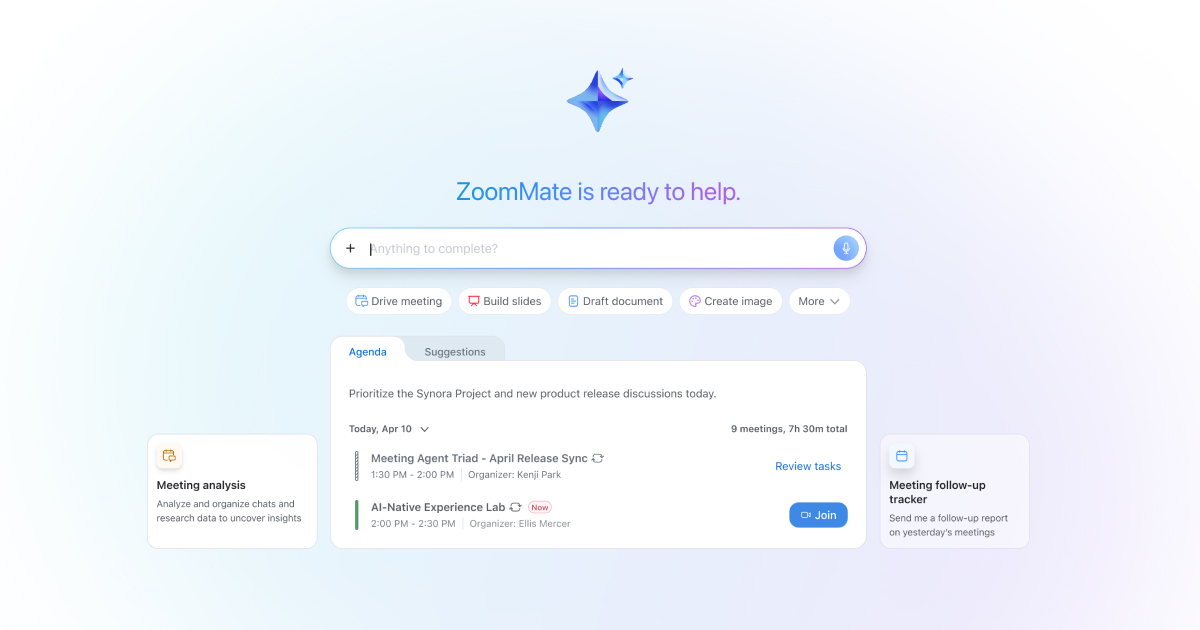
What is ZoomMate?
ZoomMate is an innovative AI-powered assistant integrated within the Zoom ecosystem, designed to automate and streamline work processes by analyzing, learning from, and acting on conversations. This tool aims to alleviate the burdens of traditional workflows by transforming discussions into tangible outputs, providing users with the ability to manage tasks and organize information seamlessly within their existing Zoom platform. As industries continue to embrace digital transformation, ZoomMate positions itself as a critical resource for businesses looking to enhance productivity, improve team communications, and reduce the friction of task management.
At its core, ZoomMate utilizes agentic AI, a concept that combines reasoning, memory, task execution, and orchestration to deliver enhanced capabilities beyond basic virtual assistants. By connecting deeply with Zoom's meeting, chat, and workflow features, it can proactively assist users in various capacities. Users can leverage ZoomMate to automate mundane tasks such as drafting meeting agendas, generating reports, managing follow-up actions, and conducting research tailored to the content of ongoing discussions. This intelligence allows for a more responsive and engaged work environment that evolves according to the unique needs of each team and project.
Some standout capabilities include the ability to conduct agentic searches, which combines contextual conversation analysis with real-time data from integrated applications like Salesforce, Google Drive, and Jira. This feature enables users to pull insights and information from various sources without having to navigate through each tool separately. Additionally, ZoomMate can automate workflows, meaning that once a team identifies a repeating task, they can create an automation routine that significantly reduces the overhead associated with recurring processes like meeting preparation or project updates. Users can customize workflows and even build custom agents tailored to specific roles, further enhancing productivity and effectiveness.
ZoomMate is particularly valuable for teams across diverse sectors such as IT, sales, marketing, and project management. For instance, during meetings, ZoomMate captures content and context automatically, generating summaries and managing task assignments in real time. It can also prepare users for their day by providing daily briefings that summarize key projects and tasks based on past activities. In scenarios where immediate decision-making is crucial, such as incident resolution or project tracking, ZoomMate can prioritize information and surface critical updates swiftly, enabling teams to remain agile.
In comparison with other AI assistants on the market, ZoomMate distinguishes itself by its deep integration within the Zoom ecosystem alongside a proactive approach. Traditional virtual assistants reactively answer queries and assist users on request, but ZoomMate actively engages in the workflow, offering contextual awareness and executing tasks autonomously. This represents a shift from merely providing assistance to actively driving outcomes.
Despite its robust capabilities, some limitations and considerations exist. Users must operate within a credit-based system, meaning that while they can access certain functionalities without using credits, more extensive usage may incur limitations depending on their plan. Additionally, while ZoomMate's automation can significantly enhance productivity, users may face an initial learning curve as they adapt to creating and managing workflows and agents tailored to their needs. Overall, ZoomMate presents a compelling solution for those looking to integrate AI into their daily workflows, offering a blend of intuition and performance that can help teams achieve more with less effort.
Who it's for
Works with
What ZoomMate can do
8 capabilities, verified from the product.
- AI-powered task execution
- Agentic search across integrated data sources
- Workflow automation for repetitive tasks
- Customizable meeting notes and templates
- Integration with tools like Salesforce and Jira
- Real-time web and document search capabilities
- Automated generation of slide decks and reports
- Daily briefings based on project status and news
Jobs people hire it for
- 01Automate meeting follow-up tasks like emails and document creation
- 02Generate slide decks directly from meeting notes
- 03Provide daily briefings summarizing key projects
- 04Conduct research and aggregate information for incident resolution
- 05Build and execute custom workflows for project management
Pros & cons
Where it shines
- Seamlessly integrates into the Zoom ecosystem, enhancing existing workflows
- Offers advanced AI features capable of decision-making and task execution
- Memory features allow for personalized assistance based on user history
- Custom agent capabilities cater to specific team needs and tasks
Where it falls short
- Requires a credit-based subscription model that may limit extensive use
- May involve a learning curve for users unfamiliar with workflow automation
- Limited features available under the basic plan for free users
- Dependence on Zoom apps and integrations which may not suit all organizations
Pricing
ZoomMate Basic
Free
Limited AI features included with Workplace Basic.
ZoomMate
$user/month
Includes extensive features for enhanced productivity and task execution.
Plans starting at $user/month, billed annually Pricing can change — always confirm on the vendor's site.
Frequently asked about ZoomMate
What is agentic AI?
Agentic AI in ZoomMate refers to its ability to reason through situations, recall past interactions with memory, take actionable tasks, and orchestrate complex workflows across various tools. This helps users to get more accomplished with minimal effort, making it a powerful assistant.
How does ZoomMate differ from a regular AI assistant?
ZoomMate goes beyond standard AI assistants by offering deep context awareness and proactive execution. It integrates directly with your work tools such as meetings, documents, and chats, allowing it to perform complex tasks and generate deliverables based on conversations, rather than just responding to isolated prompts.
How can I get started with ZoomMate?
To get started with ZoomMate, users need to obtain an active ZoomMate license which unlocks the advanced capabilities. Understanding the credit system is crucial for managing AI activity, as some functions are available without using credits, allowing immediate benefits.
What types of tasks can ZoomMate automate?
ZoomMate can automate various tasks such as creating meeting agendas, drafting follow-up emails, generating reports and slide decks, and executing workflows based on triggers from meetings, chats, or schedules.
Who can benefit from using ZoomMate?
ZoomMate is beneficial for teams across different sectors including IT, sales, and marketing, as well as for individuals who seek to streamline their daily tasks, enhance meeting productivity, and remain organized in their work processes.
Can ZoomMate integrate with other tools?
Yes, ZoomMate integrates with various third-party applications such as Salesforce, Jira, Google Drive, and OneDrive, allowing it to access and utilize data across different platforms seamlessly.
What is included in the free ZoomMate plan?
The free ZoomMate plan provides limited features including AI note-taking, meeting summaries for a certain number of hosted meetings per month, and agentic search capabilities with constraints on usage.
Are there any limitations to using ZoomMate?
While ZoomMate offers advanced tools, it operates on a credit system that may limit extensive use depending on the user's plan. Additionally, users might experience learning curves related to the automation setup and navigation within the features.
Ready to try ZoomMate?
1,545 people checked it out on the directory — see it in action on the official site.
Keep exploring
Similar tools in Productivity & Agents
 Productivity & Agents
Zapier Agents
No-code AI agents that work across 7,000+ apps — automation that thinks.
 Productivity & Agents
Reclaim AI
An AI calendar that defends your focus time and schedules your tasks automatically.
 Productivity & Agents
Maestro Labs
AI tools for Outlook, Teams & Office, enhancing productivity in Microsoft 365.
 Productivity & Agents
Studyable
AI-powered study app offering instant homework help and flash cards.