
Talanoa
A local-first email client that turns threads into conversations, tasks, and calendar actions.
What is Talanoa?
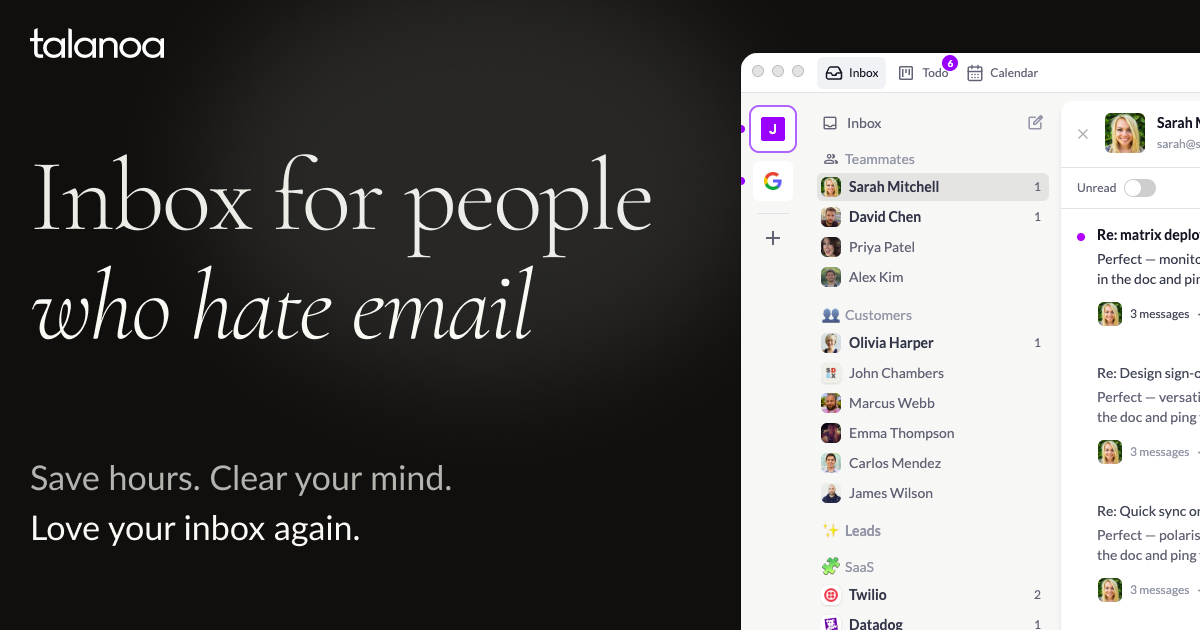
Talanoa is a desktop email application that reworks email around conversations instead of long quoted threads. Its homepage describes it as a “people-first inbox” that turns messages into bubbles, hides quotes, signatures, and disclaimers, and lets you read and reply in a chat-like format. It is aimed at making email feel less like inbox maintenance and more like managing actual conversations and follow-up work.
The core workflow combines email, tasks, and calendar inside one app. From an email thread you can create a task, add a due date, track progress, and keep the original conversation attached. Talanoa also includes a built-in calendar workflow for responding to meeting invites, checking availability, and sharing booking links with several time options. The site presents these as part of the same conversation, so you can move from email to action without switching apps.
Talanoa also includes an AI layer that runs locally on the user’s computer. The homepage says you can ask your inbox in plain words, search emails and attachments, check to-dos, and look at your calendar, with answers showing their sources and nothing happening until you confirm. It can summarize long threads into decisions and next steps, draft replies in your own tone, and translate messages. The product emphasizes that the model runs on your device, with no cloud uploads and no Talanoa server in between.
The app supports Gmail, Microsoft Outlook/Hotmail, Yahoo Mail, iCloud Mail, and any standard IMAP/SMTP-compatible provider. It is available as a native desktop app for macOS, Windows 10+, and Linux, with Linux packages for Debian/Ubuntu and Fedora/RHEL. The research also says iOS and Android are in beta; the mobile app is not yet on the App Store or Google Play, but can be joined from the desktop app. Talanoa supports multiple accounts in one unified inbox, though multi-account is on the Pro plan.
Pricing is simple and public. The Free plan is $0 forever and includes one email account, 2 blocks/unsubscribes per month, up to 5 Kanban tasks, privacy by default, and the people-first inbox view. Pro costs $7.50 per month, or $90 billed annually, and adds unlimited email accounts, unlimited blocks and unsubscribes, unlimited Kanban tasks, the iOS and Android beta mobile app, priority support, and future features. The pricing page says you can cancel anytime and do not need a credit card to start.
Talanoa’s main trade-offs are clear from the plan structure and platform details. The free plan is functional, but it is capped at one account, two blocks/unsubscribes per month, and five tasks. Mobile is still in beta rather than publicly available on app stores, and the app is desktop-first. The product is also privacy-first and local-first by design, so it is centered on people who want their email handled on their own machine rather than in a cloud service.
Who it's for
Works with
What Talanoa can do
13 capabilities, verified from the product.
- People-first inbox view
- Conversation-style email bubbles
- Kanban tasks from email threads
- Built-in calendar scheduling
- Ask AI inbox search
- AI thread summarization
- AI reply drafting
- AI translation
- Unified inbox across accounts
- Local-first desktop storage
- Unsubscribe and block senders
- Native desktop apps
- iOS and Android beta mobile app
Jobs people hire it for
- 01Turn customer emails into tracked tasks
- 02Manage follow-up work from stakeholder emails
- 03Schedule meetings from within email threads
- 04Search inbox, tasks, and calendar with AI
- 05Summarize long email threads into action items
- 06Draft replies in your own tone
- 07Translate replies into another language
- 08Group tool notifications into daily digests
Pros & cons
Where it shines
- Combines email, tasks, and calendar in one workflow.
- Local-first AI keeps processing on the user’s device.
- Supports major providers plus any IMAP-compatible mailbox.
- Public pricing includes a free plan with no credit card to start.
- Pro plan removes account and task limits.
Where it falls short
- The free plan is limited to one account and five tasks.
- Blocks and unsubscribes are capped at 2 per month on Free.
- The mobile app is still in beta and not in app stores yet.
- Multi-account support is only on Pro.
- The product is desktop-first, with mobile still secondary.
Pricing
Free
$ 0
Forever free; one email account, 2 blocks/unsubscribes per month, up to 5 Kanban tasks, privacy by default, people-first inbox view.
Pro
$ 7.50 / mo
$90 billed annually; unlimited email accounts, unlimited blocks/unsubscribes, unlimited Kanban tasks, iOS & Android beta, priority support, all future features included.
Free $0 forever free; Pro $7.50/mo ($90 billed annually) Pricing can change — always confirm on the vendor's site.
Frequently asked about Talanoa
What does Talanoa do?
Talanoa is a desktop email client that turns email threads into chat-like conversations. It also includes Kanban tasks and a built-in calendar, so you can manage follow-up work and scheduling in the same app. Its AI can search, summarize, draft replies, and translate, all locally on your computer.
Is Talanoa free?
Yes. The Free plan is $0 forever free. It includes one email account, 2 blocks/unsubscribes per month, up to 5 Kanban tasks, privacy by default, and the people-first inbox view.
What does Pro include?
Pro costs $7.50 per month, or $90 billed annually. It includes unlimited email accounts, unlimited blocks and unsubscribes, unlimited Kanban tasks, the iOS and Android beta app, priority support, and all future features.
Which email providers are supported?
Talanoa supports Gmail, Microsoft Outlook/Hotmail, Yahoo Mail, and iCloud Mail natively. It also works with any standard IMAP/SMTP-compatible provider, including custom or self-hosted email servers.
Which platforms does Talanoa support?
Talanoa is available as a native desktop app for macOS, Windows 10+, and Linux. The iOS and Android app is in beta and can be joined from the desktop app, but it is not yet on the App Store or Google Play.
Does Talanoa use cloud AI or store my email on its servers?
No. The site says the model runs on your computer, with no cloud uploads and no Talanoa server in between. It also says your emails stay on your device and that nothing leaves it when using the local AI features.
Can I use multiple email accounts?
Yes, Talanoa supports multiple email accounts in one unified inbox. However, multi-account is available on the Pro plan.
Ready to try Talanoa?
1,358 people checked it out on the directory — see it in action on the official site.
Keep exploring
Similar tools in Productivity & Agents
 Productivity & Agents
Zapier Agents
No-code AI agents that work across 7,000+ apps — automation that thinks.
 Productivity & Agents
Reclaim AI
An AI calendar that defends your focus time and schedules your tasks automatically.
 Productivity & Agents
Maestro Labs
AI tools for Outlook, Teams & Office, enhancing productivity in Microsoft 365.
 Productivity & Agents
Studyable
AI-powered study app offering instant homework help and flash cards.