
SlideTeam AI Presentation Maker
Generate professional presentations instantly with advanced AI technology.
What is SlideTeam AI Presentation Maker?
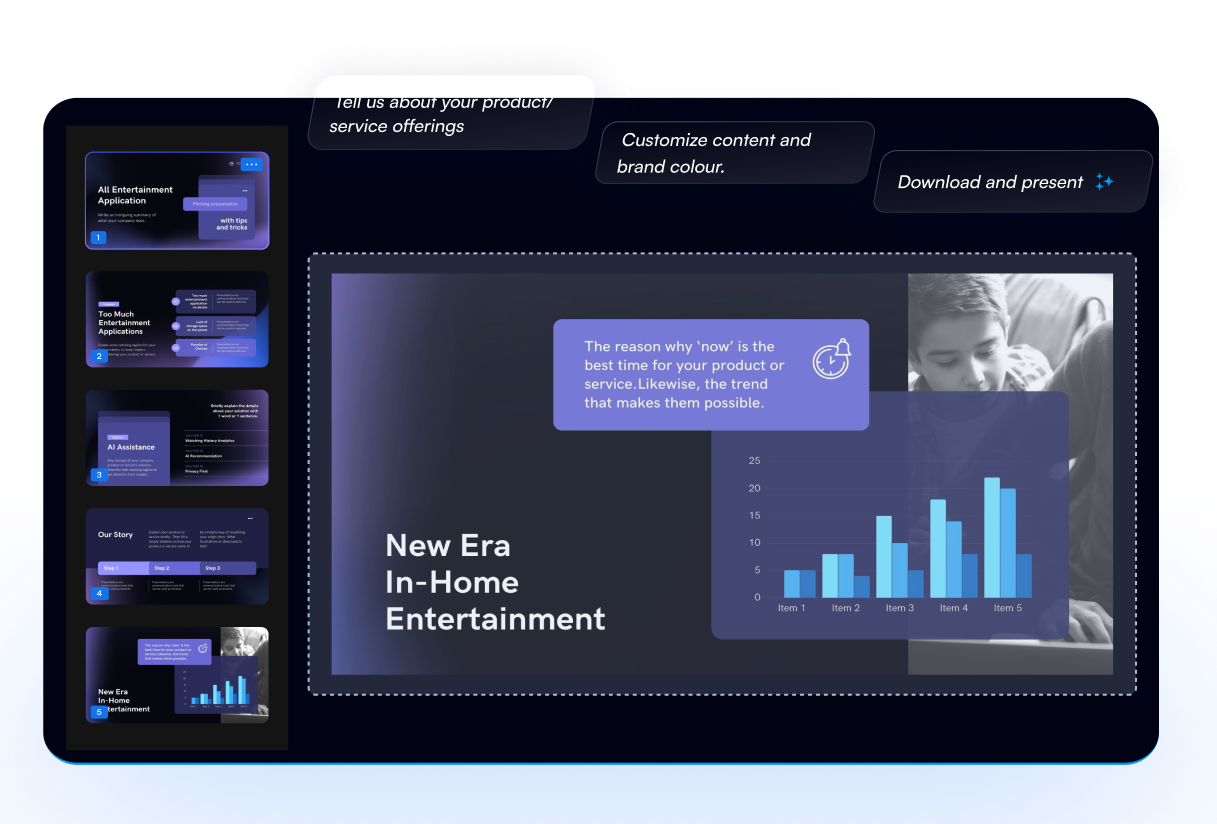
The SlideTeam AI Presentation Maker is an innovative online tool designed to swiftly convert any topic into a professional presentation. Utilizing cutting-edge AI technology, this platform effectively solves the common issues faced by individuals and businesses when preparing presentations — time consumption, consistency in design, and the complexity of structuring content effectively. The platform is tailored for anyone needing to produce impressive PowerPoint presentations in a fraction of the usual time, making it especially valuable for entrepreneurs, company owners, and professionals who wish to capture the attention of investors or clients.
The core workflow of the SlideTeam AI Presentation Maker revolves around a simple three-step process that enhances both usability and efficiency. First, users describe their topic or upload relevant documents that contain the necessary information. Next, the AI analyzes this input to generate a structured outline that forms the backbone of the presentation. Finally, the tool employs its Smart Layout & Design Automation to convert the outline into ready-to-edit slides in less than 60 seconds. This streamlined process not only reduces manual formatting work but also ensures that each presentation adheres to professional design standards and storytelling principles.
Standout features of the SlideTeam AI Presentation Maker include a vast library of over 5 million professionally designed templates that cater to various presentation styles and requirements. Each slide generated follows a human-centered logic, ensuring that it aligns with proven frameworks rather than random layouts. The AI's ability to understand and implement smart layout corrections enhances the overall aesthetic and functional quality of the presentations. Additionally, the platform allows outputs in multiple formats, including PowerPoint, Google Slides, and Keynote, accommodating users from different backgrounds and preferences. Another significant feature is the Brand Kit, which facilitates one-click formatting, enabling users to personalize their slides to match corporate branding seamlessly.
This tool is designed with a user base that spans various sectors, making it highly versatile. Typical scenarios for use include creating pitch decks for startups, project reports for corporate meetings, educational presentations for classrooms, and marketing content for business promotions. Its capability to cater to thousands of academic and business topics strengthens its appeal among diverse audiences such as educators, marketers, consultants, and business professionals. The multilingual support further broadens accessibility, allowing users across the globe to generate presentations in five or more languages.
In comparison to its competitors, the SlideTeam AI Presentation Maker sets itself apart with its comprehensive AI-integrated library and its focus on corporate-friendly outputs. It outperforms alternative tools such as Canva AI and Beautiful.ai by offering more tailored functionalities suited for business contexts, such as smart design automation and extensive customization options. Users benefit from the high-quality narrative structure and visual consistency that almost automatically adapt to professional standards, which is essential for those looking to make an impactful presentation quickly.
However, the tool does come with some limitations. One notable restriction is that the free version allows users to create up to 20 presentations, which may not suffice for more extensive project demands. Additionally, while the AI is adept at generating well-structured content, users may find that some highly specialized topics require manual adjustments to fine-tune the generated slides. Although the AI is trained on extensive data, it may not always capture niche requirements or specific industry jargon without a bit of user intervention. Lastly, there is a learning curve associated with navigating the features and maximizing the tool's potential, which might pose a challenge for users who are less tech-savvy.
Who it's for
What SlideTeam AI Presentation Maker can do
8 capabilities, verified from the product.
- Instantly turn any topic into slides
- Extensive library of 5M+ templates
- Human-centered slide logic for clarity
- Smart layout and design automation
- Supports download in multiple formats
- Brand Kit for one-click formatting
- Uploads and converts various document formats
- Multilingual presentation generation
Jobs people hire it for
- 01Create investor pitch decks instantly
- 02Generate project reports for stakeholders
- 03Develop educational materials for classes
- 04Design marketing presentations for campaigns
- 05Transform documents into engaging slides
Pros & cons
Where it shines
- Quick presentation generation within 60 seconds.
- Comprehensive template library enhances creativity.
- Smart design features maintain consistency and professionalism.
- Fully editable slides allow for easy customization post-generation.
- Multilingual support fosters accessibility for global audiences.
Where it falls short
- Free tier limits users to 20 presentations.
- Highly specialized topics may require manual adjustments.
- Initial learning curve for new users unfamiliar with digital tools.
- Dependence on AI may lead to occasional inaccuracies without fine-tuning.
- Customization options might be overwhelming for some users.
Pricing
Create up to 20 presentations for free. Pricing can change — always confirm on the vendor's site.
Frequently asked about SlideTeam AI Presentation Maker
What is the SlideTeam Free AI PPT Presentation Maker?
The SlideTeam AI Presentation Maker transforms any topic, idea, or document into a fully editable PowerPoint presentation using advanced AI technology trained on over 50 million presentations.
How does the AI Presentation Generator turn my idea into slides?
The generator works in three steps: First, you describe your topic or upload a document. Next, the AI analyzes it to form an outline, and finally, it automatically converts this outline into polished presentation slides.
Is the AI-generated presentation fully editable in PowerPoint and Google Slides?
Yes, you can edit every AI-generated presentation in Microsoft PowerPoint, Google Slides, and Keynote upon import, allowing for complete customization of text, layout, colors, and branding.
What makes SlideTeam’s AI PPT Maker better than other AI presentation tools?
SlideTeam stands out with the largest library of AI-integrated templates, smart layout corrections, a user-friendly brand kit, and superior narrative logic which cater specifically to business presentations.
What formats can I export my AI-generated presentation in?
You can export presentations in PPTX (PowerPoint), PDF, and Google Slides formats while retaining full editability and design quality.
How fast can the AI create a presentation?
Most presentations can be generated within 60 seconds thanks to the AI's optimization and analysis of 50 million pre-structured slide layouts.
Is there a limit to how many presentations I can create for free?
Yes, the free version of the tool allows users to create up to 20 presentations.
Is my data safe when using the AI Presentation Maker?
Yes, all uploaded files and content are processed securely, remaining confidential without being stored or shared by SlideTeam.
Ready to try SlideTeam AI Presentation Maker?
2,121 people checked it out on the directory — see it in action on the official site.
Keep exploring
Similar tools in Productivity & Agents
 Productivity & Agents
Zapier Agents
No-code AI agents that work across 7,000+ apps — automation that thinks.
 Productivity & Agents
Reclaim AI
An AI calendar that defends your focus time and schedules your tasks automatically.
 Productivity & Agents
Maestro Labs
AI tools for Outlook, Teams & Office, enhancing productivity in Microsoft 365.
 Productivity & Agents
Studyable
AI-powered study app offering instant homework help and flash cards.