
- Views
- 1,728
- Upvotes
- 136
- Launched
- —
What is Google Lens?
Google Lens is an innovative visual search tool that allows users to explore their surroundings using their device's camera. Designed to bridge the gap between the physical and digital worlds, Google Lens enables users to conduct searches based on images, texts, and objects they encounter in real life. This feature addresses the challenge of articulating visual queries in traditional text-based search interfaces, making it easier and faster to find information, identify items, and complete tasks based on visual inputs.
The core functionality of Google Lens revolves around its ability to interpret and respond to what the user sees through their camera lens. Users can either point their camera at an object, take a photo, or upload an existing image to search for related information. For instance, if someone sees a piece of furniture that they are interested in, they can use Google Lens to find similar items or even purchase it online without needing to describe it in words. Additionally, Google Lens can translate text in real-time from over 100 languages, allowing users to easily comprehend written information in foreign languages.
One of the standout capabilities of Google Lens is its step-by-step homework help function, which offers assistance in a variety of subjects, including math, history, chemistry, biology, and physics. If a student finds themselves stuck on a problem, they can quickly capture an image of it and receive a range of explanatory resources like video guides and related web results. This makes Google Lens an invaluable tool for learners seeking immediate help with their studies.
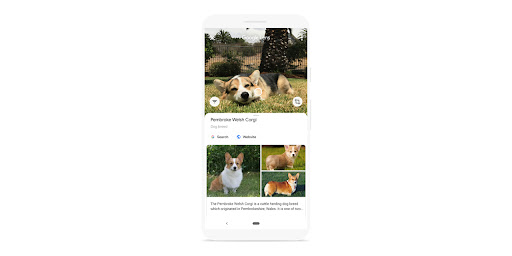
Google Lens is particularly beneficial for a wide array of audiences, including students, home decorators, nature enthusiasts, and anyone who frequently engages in online shopping. A student might use it for homework assistance, a homeowner could use it to identify stylish furniture, and a pet lover may use it to figure out what breed of dog they encountered during a walk. Its versatility and ease of use make it an essential tool for everyday tasks and inquiries that require visual identification or exploration.
In terms of market positioning, Google Lens differentiates itself by leveraging Google's powerful image recognition technology, which integrates seamlessly with other applications such as Google Photos, Google Camera, and even within Chrome. This makes it incredibly accessible and useful across various devices and platforms. Furthermore, Google Lens also allows users to search and access information without needing to type out words, offering a more intuitive form of interaction with digital content.
Despite its powerful features, Google Lens may have some limitations. While it excels in recognizing a wide variety of objects, there can be occasional inaccuracies depending on the complexity of the image or the uniqueness of the item. Additionally, the tool may require an active internet connection for optimal performance, as it often relies on online databases to deliver results. Users who prefer offline functionality might find this aspect limiting. Overall, Google Lens stands out as a revolutionary tool for visual discovery, offering a new dimension to how individuals interact with their environment and the information that surrounds them.
Who it's for
What Google Lens can do
8 capabilities, verified from the product.
- Search by pointing your camera
- Identify plants and animals
- Translate real-time text in multiple languages
- Find similar clothing and home decor
- Step-by-step help for homework
- Access information across devices
- Scan images to copy text easily
- Discover more about the world around you
Jobs people hire it for
- 01Take a picture of a flower to find its species
- 02Locate a similar outfit online after seeing it in a store
- 03Translate restaurant menus while traveling
- 04Get homework assistance by capturing a math problem
- 05Identify dog breeds at a park
- 06Discover furniture styles for a home renovation
- 07Copy down serial numbers from an electronic device easily
Pros & cons
Where it shines
- Seamless integration with other Google services enhances usability.
- Real-time translation feature is very useful for travelers.
- Offers diverse applications from shopping to education.
- Visual search capabilities reduce the need for text input.
- Very user-friendly interface with instant access on devices.
Where it falls short
- Accuracy can vary with complex images or uncommon objects.
- Requires an internet connection for optimal functionality.
- Limited offline capabilities may restrict use in some situations.
- Some users may find it challenging to articulate specific queries visually.
Pricing
See the official website for current pricing. Pricing can change — always confirm on the vendor's site.
Frequently asked about Google Lens
What is Google Lens?
Google Lens is a visual search tool that allows users to identify objects, translate text, and receive information based on images or objects they see through their camera. It transforms how users interact with the world by focusing on visual queries rather than textual ones.
What features does Google Lens offer?
Google Lens offers a variety of features including the ability to search visually by pointing your camera at objects, translate text in real-time from over 100 languages, identify plants and animals, and provide homework assistance with step-by-step guides.
How do I access Google Lens?
Google Lens can be accessed through the Google app, Google Camera, Google Photos, and the Chrome browser. Users can simply point their camera at a subject or upload an image to start using the service.
What devices can run Google Lens?
Google Lens is available on multiple platforms including web browsers, iOS devices, Android devices, and Chrome, allowing users to access its features across various devices.
Is Google Lens free to use?
Yes, Google Lens is completely free to use, providing all its features without any subscription or payment required.
Can Google Lens work offline?
While some functionalities may be accessible offline, Google Lens is designed to utilize online resources for data, making an internet connection preferable for optimal use.
How accurate is Google Lens in identifying objects?
The accuracy of Google Lens can vary based on the complexity and uniqueness of the object being identified. While it works well for many standard items, there may be occasional inaccuracies.
Who is Google Lens best suited for?
Google Lens is ideal for a diverse audience including students looking for homework help, home decorators searching for design inspiration, anyone who needs to translate text while traveling, and individuals looking to identify plants or animals.
Ready to try Google Lens?
1,728 people checked it out on the directory — see it in action on the official site.
Keep exploring
Similar tools in Productivity & Agents
 Productivity & Agents
Zapier Agents
No-code AI agents that work across 7,000+ apps — automation that thinks.
 Productivity & Agents
Reclaim AI
An AI calendar that defends your focus time and schedules your tasks automatically.
 Productivity & Agents
Maestro Labs
AI tools for Outlook, Teams & Office, enhancing productivity in Microsoft 365.
 Productivity & Agents
Studyable
AI-powered study app offering instant homework help and flash cards.