
- Views
- 1,263
- Upvotes
- 157
- Launched
- —
What is eesel?
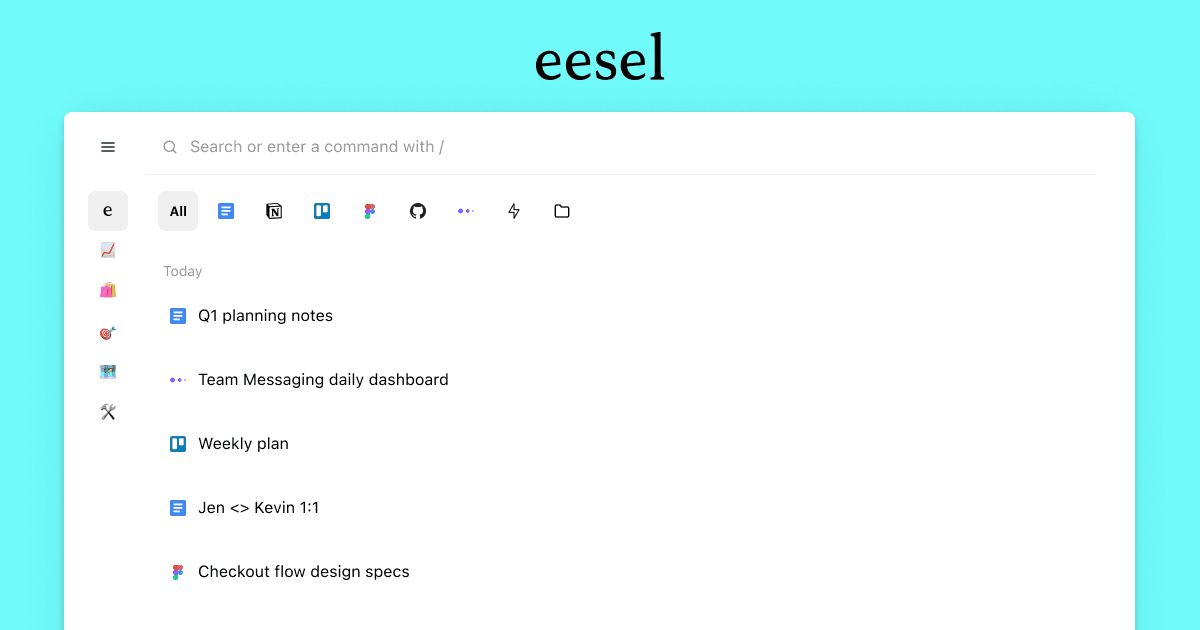
eesel is an innovative productivity tool designed to enhance your workflow by intelligently curating the documents you need to access most frequently. It addresses the common problem of information overload and document chaos that many professionals face in their daily routines. By filtering your browser history, eesel ensures that only the most relevant and recent documents are presented right in your new tab, streamlining the retrieval process and saving valuable time. This is particularly beneficial for users who juggle multiple projects and applications, offering a centralized location for important resources.
The core workflow of eesel revolves around its ability to filter and organize your documents based on your browser history. When you open a new tab, eesel automatically compiles a list of recent documents, which can be filtered by app or searched by title or content. This functionality allows users to quickly find specific documents without needing to sift through multiple browser tabs or applications. As a result, eesel transforms the new tab experience into a powerful productivity hub tailored to the user's work needs.
One of eesel's standout capabilities is its intelligent filtering system. This feature allows users to categorize documents not only by recent activity but also by the applications they are associated with, permitting quick access to the most relevant files. The search functionality, which allows users to search by title or content, further enhances its utility by drastically reducing the time spent retrieving documents. With everything consolidated into one place, users can focus more on their tasks rather than on the minutiae of document management.
Eesel is ideal for professionals across various domains, particularly those in fast-paced work environments where quick access to documents is crucial. Typical scenarios include remote workers who frequently collaborate on projects requiring rapid document access, as well as teams working in creative or technical fields where multiple resources must be referenced quickly. For example, a project manager could benefit from quickly retrieving relevant project files or reports, while a content marketer could seamlessly access blog drafts and analytics documents without distraction.
In comparison to other tools that manage or organize documents, eesel offers a more integrated and user-friendly experience. Many traditional document management systems involve complex setups and interfaces, while eesel simplifies the experience by using the familiar browser environment. This makes it particularly appealing for individuals who may not have the time or inclination to learn a new platform. However, it’s worth mentioning that eesel's utility is largely dependent on users’ browsing habits; without adequate or consistent browser history, the tool may not perform optimally.
Despite its numerous advantages, users should keep in mind some limitations associated with eesel. For instance, the effectiveness of the filtering and sorting functionalities is contingent on the completeness and accuracy of users’ browser history. Additionally, users with infrequent browser history updates may find that the tool takes some time to adapt fully to their workflow needs. Moreover, as Eesel is designed specifically for browsing activities, those seeking comprehensive document management features may need to look for complementary tools to meet all their needs.
Who it's for
What eesel can do
8 capabilities, verified from the product.
- Filters browser history for relevant documents
- Displays recent docs in new tab
- Allows filtering by app
- Searches by title or content
- Centralizes document access
- Saves time in document retrieval
- Streamlines workflow processes
- Enhances productivity in remote work
Jobs people hire it for
- 01Quickly access recent project documentation
- 02Find specific files without browser clutter
- 03Retrieve documents rapidly during meetings
- 04Organize resources by application for efficiency
- 05Facilitate collaborative document access
Pros & cons
Where it shines
- Intuitive interface that integrates seamlessly with browser workflows
- Highly efficient at retrieving recent and relevant documents
- Reduces time spent searching for files across multiple platforms
- Offers robust filtering options to optimize document retrieval
Where it falls short
- Depends on the user's browser history for optimal performance
- May require a period of adjustment to establish effective document filtering
- Limited features compared to comprehensive document management systems
Pricing
See the official website for current pricing. Pricing can change — always confirm on the vendor's site.
Frequently asked about eesel
What does eesel do?
eesel filters your browser history to showcase documents that are necessary for work right in your new tab. It ensures that users see only relevant files, helping to reduce clutter and streamline document access.
Is there a free version of eesel?
Yes, eesel operates on a free model, allowing users to access its core features without any cost.
What platforms does eesel support?
eesel is primarily designed as a web-based application, functioning seamlessly in any web browser.
How does eesel improve document retrieval?
eesel utilizes intelligent filtering based on browser history to show recent documents, enabling users to quickly access files without navigating away from their current tasks.
Who is the target audience for eesel?
eesel is designed for professionals such as remote workers, project managers, and marketers who benefit from quick access to documents in a fast-paced work environment.
What are some limitations of eesel?
Eesel's performance is reliant on the user's browser history. If there are gaps or infrequent usage, the filtering may not work optimally. Moreover, it offers limited features compared to full-fledged document management systems.
Can I customize how eesel filters documents?
Yes, users can filter documents by application and search by title or content to refine the list that eesel presents.
How does eesel compare to traditional document management tools?
Eesel simplifies the document management process by integrating into the browser experience, making it user-friendly compared to traditional tools that often require complex setups.
Ready to try eesel?
1,263 people checked it out on the directory — see it in action on the official site.
Keep exploring
Similar tools in Productivity & Agents
 Productivity & Agents
Zapier Agents
No-code AI agents that work across 7,000+ apps — automation that thinks.
 Productivity & Agents
Reclaim AI
An AI calendar that defends your focus time and schedules your tasks automatically.
 Productivity & Agents
Maestro Labs
AI tools for Outlook, Teams & Office, enhancing productivity in Microsoft 365.
 Productivity & Agents
Studyable
AI-powered study app offering instant homework help and flash cards.