
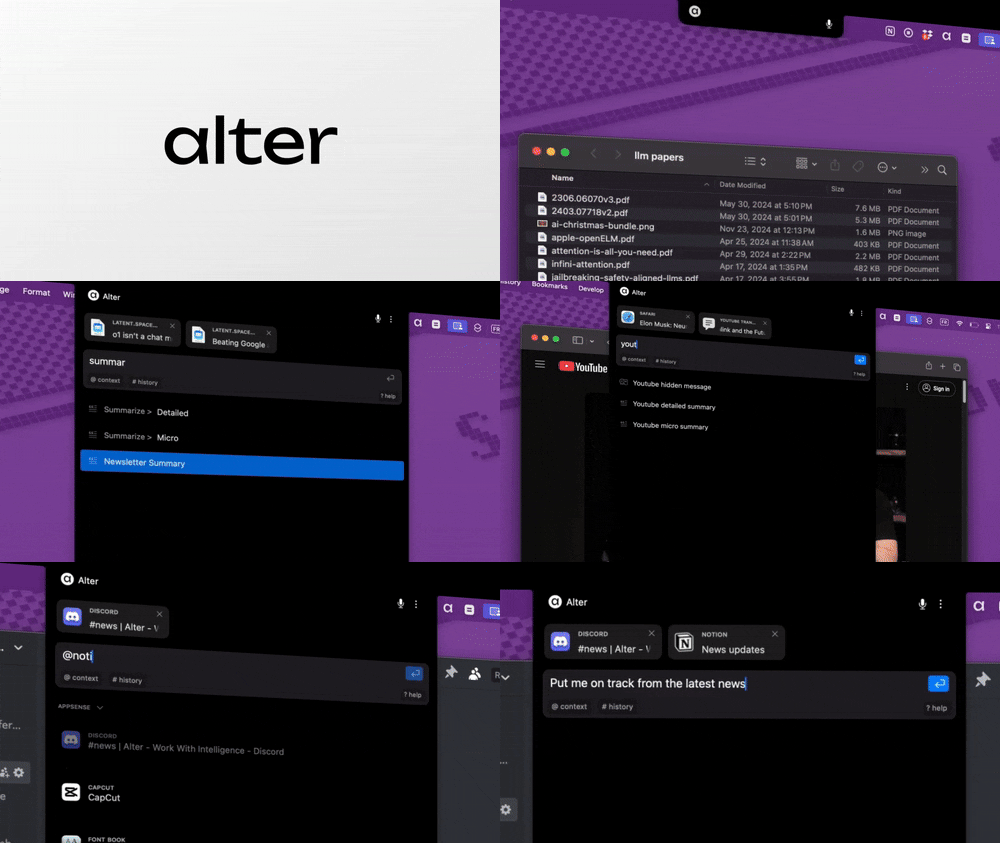
What is Alter?
Alter is a macOS application designed to transform how users interact with their Apple machines by integrating advanced artificial intelligence capabilities directly into their workflow. Unlike standard productivity tools that operate in isolation, Alter combines voice commands with contextual understanding of the active screen and applications, enabling users to execute complex tasks merely by speaking. This design eliminates the need for traditional keyboard navigation, streamlining operations significantly and addressing the often cumbersome nature of multi-application environments. By empowering users to 'think it and say it,' Alter promises to supercharge productivity for Mac users seeking a more efficient way of working.
The core functionality of Alter revolves around its ability to access and control applications through voice commands. Leveraging local AI models, it processes requests directly on the user’s machine, ensuring that operations are fast, secure, and contextually aware. Alter seamlessly integrates with a variety of applications, from communication tools like Slack and Gmail to productivity platforms such as Notion and Linear. Users can launch apps, dictate messages, or manage files without needing to switch contexts, effectively reducing the friction often associated with traditional workflows. With its robust technology, Alter has the potential to redefine how tasks are performed across the Mac ecosystem.
One of the standout capabilities of Alter is its powerful voice command system enhanced by 3D contexts. The app utilizes voice-first workflows to facilitate faster task completion, reportedly working up to three times faster than competing AI models such as ChatGPT or Claude. Furthermore, with over 80 built-in actions and the ability to create custom ones, users can tailor their experience to suit specific workflows, resulting in a highly personalized productivity solution. Notably, Alter supports advanced automation, allowing users to connect with over 2,000 apps and leverage built-in applications for sophisticated task management and orchestration.
Typical users of Alter are Mac power users—those who rely heavily on their devices for various tasks and seek to maximize their efficiency. This includes professionals who manage numerous communications, project managers who juggle various software tools, and writers who need to streamline content creation. Scenarios such as automatic meeting summaries, extracting insights from research materials, or performing quick data manipulations across applications can be significantly enhanced with Alter’s capabilities. Users can quickly interact with their digital workspace, effectively turning every app on their Mac into a voice-controlled assistant that enhances productivity without sacrificing user control or privacy.
In the competitive landscape of AI productivity tools, Alter positions itself uniquely by focusing solely on the macOS environment and maintaining a high level of contextual awareness and integration. While tools like ChatGPT and others provide generalized AI responses, they often lack the ability to interact deeply with operating system functions and installed applications. Alter’s native integration with macOS offers a more cohesive experience compared to alternatives that function as separate web applications. Additionally, Alter emphasizes user privacy, ensuring that all data is processed locally and remains encrypted, distinguishing itself from cloud-dependent solutions.
However, potential users should be aware of some limitations. First, the requirement of macOS Ventura 13 or newer can exclude users with older systems. Additionally, while the voice command system is robust, its effectiveness may vary depending on individual accents or clarity of speech. Users should also consider that, while Alter supports a wide range of applications, full functionality may not extend to every native macOS app at launch. Furthermore, early adopters may encounter bugs or limitations associated with the application's beta nature, though the team actively addresses such issues through regular updates. Lastly, while there is a free trial available, users should note that continuous access beyond the trial period may require a paid subscription for full features.
Overall, Alter provides a compelling solution for macOS users seeking to harness the power of AI to improve their daily workflows. With its innovative approach to combining voice commands with native application controls, Alter aims to make productivity not just achievable but effortless, placing it at the forefront of AI solutions tailored for the Mac ecosystem.
Who it's for
What Alter can do
8 capabilities, verified from the product.
- Voice-first command execution
- Contextual understanding of Mac apps
- Integration with over 2,000 applications
- Speed optimization for task execution
- Smart meeting recording and summarization
- Automated response insertion into any app
- Support for local AI models and offline use
- Automatic selection of the best AI model per task
Jobs people hire it for
- 01Automate meeting summaries and transcriptions
- 02Extract insights from web pages without leaving the browser
- 03Control macOS apps using voice commands
- 04Seamlessly integrate AI responses into existing workflows
- 05Manage tasks across multiple apps efficiently
Pros & cons
Where it shines
- Transformative voice-first user experience that accelerates productivity.
- Native integration with macOS feels seamless for users.
- Strong emphasis on privacy with local data processing options.
- Fast task execution significantly improves workflows compared to traditional methods.
Where it falls short
- Limited to macOS Ventura 13 and newer versions, excluding older Mac users.
- Voice command accuracy may vary with different accents or speech clarity.
- Certain features still in beta may exhibit bugs or require refinement.
- Free trial followed by a paid plan may deter users looking for long-term free solutions.
Pricing
7-day free trial + options for paid plans Pricing can change — always confirm on the vendor's site.
Frequently asked about Alter
What makes Alter different from other tools?
Alter stands out as a native macOS AI assistant that understands the user's current work context. Its seamless integration with all applications allows users to accomplish more with less effort, combining voice commands with real-time screen context.
What are the system requirements for Alter?
Alter requires macOS Ventura 13 or newer and supports both Apple Silicon and Intel processors, functioning as a universal app.
How does Alter save me time?
Alter significantly boosts productivity by providing contextual assistance directly within workflows. It helps with writing tasks, automatically records and summarizes meetings, and allows for direct interaction with files through drag-and-drop actions.
Is Alter free?
Alter offers a 7-day free trial with full access to all models without requiring a credit card. After the trial, users can continue using Alter for free with their own AI providers or choose a paid plan.
Can I use Alter offline?
Yes, Alter supports offline capabilities through local AI processing with Ollama and LM Studio, ensuring user data remains on-device and private.
What happens when my 7-day trial ends?
After the 7-day trial, users can continue using Alter for free by connecting their own AI providers or local models. There's a notification for upgrading, but core functionalities remain accessible.
Can I integrate my own API keys with Alter?
Yes, users can utilize their own API keys for model access. Detailed instructions are available in the user guide on the Alter's documentation page.
Where can I find help and support?
Users can access help and support through the Alter community on Discord or contact the support team via email for direct assistance.
Ready to try Alter?
1,986 people checked it out on the directory — see it in action on the official site.
Keep exploring
Similar tools in Productivity & Agents
 Productivity & Agents
Zapier Agents
No-code AI agents that work across 7,000+ apps — automation that thinks.
 Productivity & Agents
Reclaim AI
An AI calendar that defends your focus time and schedules your tasks automatically.
 Productivity & Agents
Maestro Labs
AI tools for Outlook, Teams & Office, enhancing productivity in Microsoft 365.
 Productivity & Agents
Studyable
AI-powered study app offering instant homework help and flash cards.