Alpine
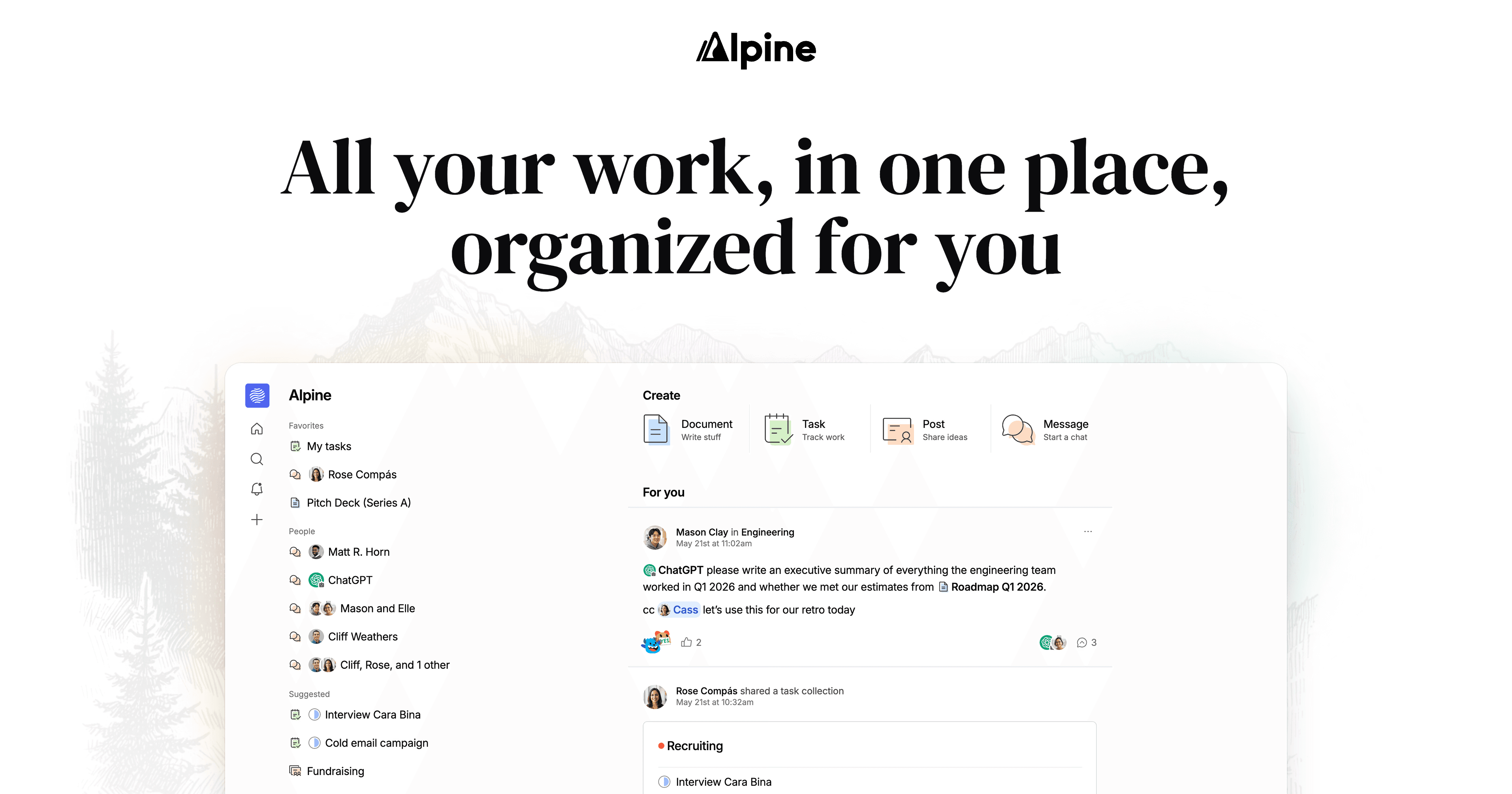
Your docs, tasks, chat, and AI in one app that organizes itself for you.
What is Alpine?
Alpine is an innovative productivity application designed to streamline your workflow by integrating multiple work functions into a single platform. The tool addresses a common pain point in the modern workspace: the need for constant context switching between various applications, such as task managers, document editors, and communication tools. With Alpine, users can capture documents, manage tasks, engage in chats, and access AI assistance, all within the same interface. This coalescing of features minimizes the friction often experienced in traditional workflows where different tools do not communicate effectively, allowing users to concentrate on their primary tasks rather than managing disparate tools.
The core workflow of Alpine revolves around its ability to unify documentation, task tracking, and communication. Users can seamlessly create documents and share them with integrated task management features that allow quick task creation and organization. The chat functionality is embedded within the workflow, allowing team members to communicate about specific tasks or documents without the tedium of switching between applications. Additionally, Alpine leverages advanced AI capabilities to provide users with personalized suggestions, intelligent searching across all content, and summarization of discussions and tasks, thereby enhancing overall productivity and information retrieval.
Some standout capabilities of Alpine include a highly personalized feed that aggregates updates from projects and team members, sophisticated search functionality that utilizes relevance and recency for streamlined information discovery, and an AI component that provides contextual assistance when needed. The integrated inbox sorts messages for priority, ensuring that users focus on essential notifications, which can reduce distractions and boost concentration. Furthermore, users can create visually appealing documents with features like image galleries and presentations that do not detract from content quality, a thoughtful design that promises both aesthetic and functional value.
Alpine is particularly suited for teams and individuals who find themselves overwhelmed with multiple applications while seeking to increase productivity. It's ideal for project teams needing a cohesive space to track progress, collaborate on documents, and communicate in real time. Additionally, remote workers who depend on clarity and organization in their tasks will find Alpine’s features particularly useful. Examples of typical scenarios include collaborative project management, asynchronous updates through forum threads, and fast-paced task tracking where immediate collaboration is necessary without losing the thread of conversation or context.
In terms of market positioning, Alpine stands out from traditional project management tools by emphasizing integration and minimized context switching. Unlike most productivity suites that expect users to toggle between apps, Alpine’s unified interface allows work to happen fluidly in one place. It brings together aspects of document creation, tasks, and communication tools, presenting a cohesive solution that can replace scattered toolsets. This positioning makes Alpine particularly appealing to organizations looking for modern, adaptable solutions that address pain points associated with traditional workloads.
Despite its many strengths, Alpine does have some limitations. As a relatively new product, its feature set may not yet be exhaustive compared to established tools. Some users may miss advanced functionalities that are present in legacy systems or more mature competitors. Additionally, being currently offered for free may present uncertainties regarding future pricing and features once the transition to a subscription model occurs. Furthermore, teams that rely heavily on specific integrations from other tools might find that Alpine’s current integrations are still developing. Users should carefully assess whether these factors align with their growth and operational requirements before fully committing to the platform.
Who it's for
What Alpine can do
8 capabilities, verified from the product.
- Integrated document creation and editing
- Task tracking with subtask options
- Personalized content feed for updates
- AI search functionality across all features
- Smart inbox prioritization
- Dynamic image gallery integration
- Instant task creation via keyboard shortcuts
- Collaborative thread-based discussions
Jobs people hire it for
- 01Capture and manage tasks in one streamlined interface
- 02Collaborate on project documents without switching apps
- 03Communicate directly within documents and tasks
- 04Search for information seamlessly across multiple work areas
- 05Create visually appealing presentations easily
Pros & cons
Where it shines
- Reduces context switching by integrating multiple productivity tools into one app.
- Highly personalized user experience with a dedicated feed for relevant updates.
- Advanced search functionality using relevance and AI technology.
- Built for performance, handling large volumes of tasks without lag.
- Aesthetic document creation tools enhance the visual presentation of content.
Where it falls short
- Still evolving; may lack advanced features present in established tools.
- Current free offering may lead to uncertainty regarding future pricing.
- Limited integration with some existing tools may hinder adoption for some teams.
- As a newer product, it may require time to build user consensus and community support.
Pricing
Lifetime Access
$250
Pay once for lifelong access to Alpine's features.
Free for now, with lifetime access for $250 Pricing can change — always confirm on the vendor's site.
Frequently asked about Alpine
What is Alpine?
Alpine is a productivity application that integrates tools for documents, tasks, chat, and AI into a single platform, aiming to reduce context switching and improve workflow efficiency.
What features does Alpine offer?
Alpine provides a cohesive interface for document creation, task tracking, collaborative forums, personalized feeds, and advanced search capabilities that leverage AI.
How does the AI functionality work in Alpine?
The AI feature in Alpine provides contextual assistance and intelligent searching across all user content, helping to deliver relevant suggestions and information that enhance productivity.
What is the pricing model for Alpine?
Currently, Alpine is free, but it will eventually transition to a subscription model. A lifetime access plan is offered for a one-time fee of $250.
Who is Alpine designed for?
Alpine is designed for teams and individuals looking for a unified workspace to manage documents, tasks, and communication without the need for multiple tools.
How does Alpine protect user data?
The Alpine team includes engineers with experience in enterprise security and intends to include SOC 2 compliance in the future, ensuring robust user data protection.
Can I use Alpine with other productivity tools?
Alpine is designed to be useful on its own, allowing users to keep using other tools they love while enhancing their existing workflow with Alpine's capabilities.
How does Alpine compare to other productivity tools?
Unlike many traditional productivity tools that require frequent context switching, Alpine combines multiple functions into one interface, promoting a more fluid and cohesive work experience.
Ready to try Alpine?
1,972 people checked it out on the directory — see it in action on the official site.
Keep exploring
Similar tools in Productivity & Agents
 Productivity & Agents
Zapier Agents
No-code AI agents that work across 7,000+ apps — automation that thinks.
 Productivity & Agents
Reclaim AI
An AI calendar that defends your focus time and schedules your tasks automatically.
 Productivity & Agents
Maestro Labs
AI tools for Outlook, Teams & Office, enhancing productivity in Microsoft 365.
 Productivity & Agents
Studyable
AI-powered study app offering instant homework help and flash cards.