
Fineshare FineCam
AI virtual camera software for HD video recording and conferencing.
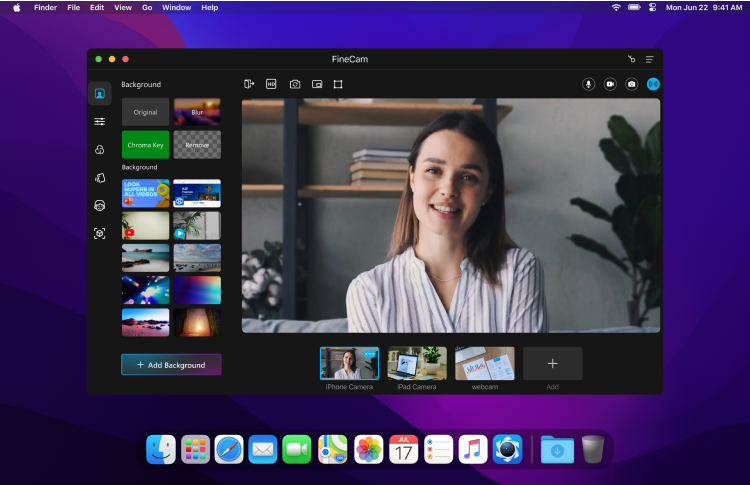
What is Fineshare FineCam?
Fineshare FineCam is a sophisticated AI virtual camera solution designed specifically for high-definition video recording and seamless video conferencing. The platform addresses common challenges faced by users, such as poor video quality and limited functionality during virtual meetings. By transforming any smartphone into a portable HD webcam and offering advanced features like background removal and easy connectivity to various video communication platforms, FineCam ensures that users can create polished and engaging video content effortlessly, no matter their location.
At its core, FineCam operates by allowing users to connect multiple types of cameras, including smartphones, DSLRs, and digital cameras, to their computer, harnessing AI-powered features to enhance video quality. Users can adjust settings such as zoom, orientation, and resolution, while adding overlays and applying filters to create a professional look. The use of AI technology for real-time background removal and unique background generation adds a creative dimension to video calls and recordings, ensuring users stand out in virtual settings. Coupled with an intuitive user interface that allows for quick startups of video sessions, FineCam makes starting a meeting or recording as effortless as a few clicks.
Among its standout features, FineCam offers robust capabilities such as the ability to seamlessly switch between camera feeds during a video call, desktop camera mode for accurate screen and webcam recording, and advanced AI algorithms for real-time enhancements. For educators and trainers, FineCam enables the integration of slides and other interactive materials into lessons, creating a more immersive experience for students. Meanwhile, remote teams can utilize its screen-sharing functionalities to collaborate effectively during meetings. Notably, FineCam's video enhancement options, including filter adjustments and smart portrait mode for bokeh effects, contribute to a visually appealing output regardless of the user's technical skill level.
FineCam is tailored for a diverse range of users, including educators who want to deliver engaging online classes, remote teams that need effective collaboration tools, sales and marketing professionals conducting product demos, and content creators aiming for polished video production. With its broad compatibility and ease of integration with popular conferencing platforms, FineCam makes it easy for users in various fields to enhance their virtual communications. Whether it's teaching lessons, conducting meetings, or live streaming engaging content, FineCam amplifies the user experience and elevates video presentations to a professional standard.
When compared to other virtual camera solutions, FineCam positions itself as a powerful tool that excels in features and functionality. Its compatibility with multiple cameras and seamless connectivity are significant advantages, allowing for greater flexibility during video production. The introduction of semantic analysis and edge detection in background removal is a testament to its advanced technological framework. However, potential users should be aware that, like any tool, it may require a slight learning curve to master all features fully. Additionally, while FineCam supports a wide range of devices for camera input, some users may still find limitations based on hardware performance or system compatibility.
In summary, Fineshare FineCam provides a feature-rich virtual camera experience that appeals to a wide array of users. Its ability to integrate advanced AI technologies with user-friendly operation makes it a compelling option for anyone looking to improve their video recording and conferencing experiences, standing out in a market that increasingly relies on digital communication.
Who it's for
What Fineshare FineCam can do
8 capabilities, verified from the product.
- Use phone as a webcam
- Real-time AI background removal
- Connect any camera seamlessly
- Advanced AI algorithm for backgrounds
- Desktop camera mode positioning
- Smart portrait mode with bokeh effect
- Video switching capability among multiple angles
- Video enhancement filters for brightness and colors
Jobs people hire it for
- 01Turn smartphone into HD webcam for online meetings
- 02Create high-quality video presentations easily
- 03Conduct interactive lessons and classes online
- 04Engage audiences effectively during product demos
- 05Stream content live with professional-grade features
Pros & cons
Where it shines
- Transforms smartphones into HD webcams with ease.
- Offers advanced background removal and customization.
- User-friendly interface makes it easy to navigate.
- Seamless integration with popular video conferencing tools.
Where it falls short
- May require a learning curve for new users.
- Performance can be limited by hardware capabilities.
- Some features might be less effective on lower-end devices.
Pricing
Free download available with additional purchase options for full features Pricing can change — always confirm on the vendor's site.
Frequently asked about Fineshare FineCam
What is Fineshare FineCam?
Fineshare FineCam is an AI virtual camera software that allows users to create high-definition videos and conduct engaging video conferences. It transforms smartphones and various cameras into portable HD webcams, enhances video quality using AI, and provides features like background removal and seamless platform integration for a professional video experience.
How does FineCam enhance video quality?
FineCam uses advanced AI algorithms for real-time background removal and provides a variety of filters and adjustments for video enhancement. Features like smart portrait mode and video switching between multiple angles also contribute to a polished video output.
Is there a free version of FineCam?
Yes, FineCam offers a free download. Users can access certain features without cost, but additional functionalities may require a purchase for full access.
Who can benefit from using FineCam?
FineCam is ideal for a variety of users, including educators who want to deliver interactive online lessons, content creators aiming for polished video outputs, and remote teams needing effective collaboration tools during virtual meetings.
What platforms does FineCam support?
FineCam is compatible with both Windows and Mac operating systems, allowing users on different platforms to utilize its features seamlessly.
Can FineCam connect to multiple camera types?
Yes, FineCam allows users to connect multiple camera types such as smartphones, DSLRs, and digital cameras, providing greater flexibility for video recording and conferencing.
How does FineCam compare to other virtual camera software?
FineCam distinguishes itself with its advanced AI features, ability to connect multiple cameras, and a user-friendly interface. While it may have a learning curve, its depth of functionality positions it favorably against other virtual camera solutions.
Ready to try Fineshare FineCam?
1,486 people checked it out on the directory — see it in action on the official site.
Keep exploring
Similar tools in Video & Audio
 Video & Audio
ElevenLabs
Hyper-realistic AI voices — text to speech, voice cloning, and dubbing in 30+ languages.
 Video & Audio
Runway
Professional AI video generation and editing — text to video, image to video, and beyond.
 Video & Audio
Suno
Generate complete songs — vocals, lyrics, and instrumentals — from a text prompt.
 Video & Audio
Flowjin
AI video clipping: Repurpose long videos into engaging short clips effortlessly.