
Picsart AI Image Generator
Generate stunning images from text prompts using 39 AI models.
What is Picsart AI Image Generator?
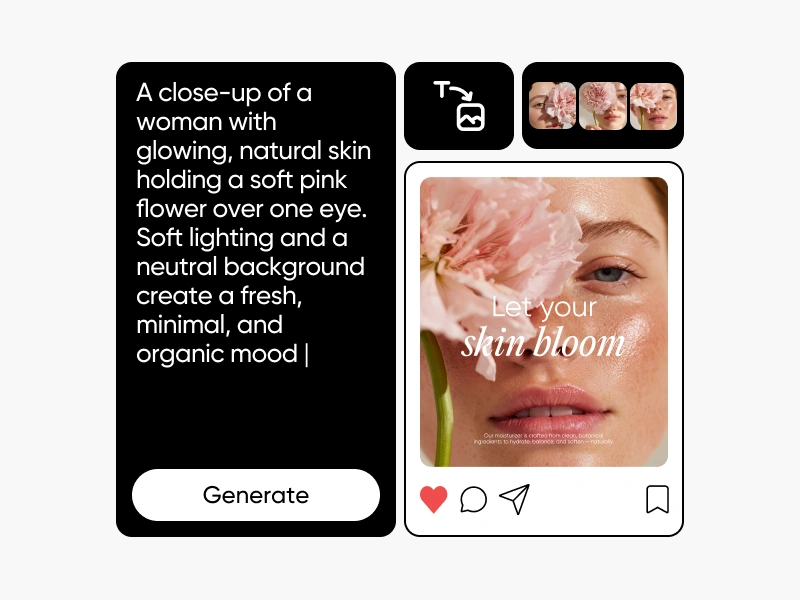
The Picsart AI Image Generator is a robust tool that allows users to turn text prompts into vivid images using cutting-edge AI models. Catering to a diverse audience, from marketers to artists, this tool simplifies the creative process by enabling anyone with an idea to produce high-quality visuals without design experience. By leveraging a range of 39 distinct AI models, each tailored for specific needs—from photorealism to illustration—users can generate artful images that meet their precise requirements quickly and efficiently. The generator is particularly beneficial for social media marketing, content creation, and personal projects, where visual appeal plays a critical role in engagement and success.
The core workflow for utilizing this generator is intuitive. Users start by entering a descriptive text prompt that outlines their envisioned image. From there, they can select from 48 built-in style presets that directly influence the aesthetic direction of the final result. Once satisfied with their selections, users simply hit generate, and the AI model processes the prompt to create an image in seconds. This streamlined approach not only makes the image creation process accessible to everyone but also allows for exploration, as users can modify their prompt and try out different styles without needing extensive design skills.
One standout capability of the Picsart AI Image Generator is its speed and the quality of output. Users can produce high-resolution images up to 8K, which are suited for a variety of applications, including print media and online platforms. The range of available models caters to different artistic needs—whether it's achieving realistic lighting, generating text within images, or creating artistic styles—giving users the flexibility to choose the perfect model for their specific project. Additionally, the integration of editing tools lets users refine generated images without leaving the platform. This means that after generating an image, users can enhance it, adjust elements, or swap backgrounds seamlessly within the same workflow.
The target audience for the Picsart AI Image Generator spans various industries and roles. Content creators, social media managers, advertisers, and graphic designers will find this tool invaluable for generating quick drafts or polished final visuals. Moreover, hobbyists and individuals seeking to create unique artwork for personal use will benefit from the user-friendly interface and the diverse output options promised by the array of AI models. For example, a marketer may use the platform to quickly produce visually appealing graphics for ad campaigns, while an artist might utilize it to explore new styles and concepts for their work.
In terms of competitive positioning, the Picsart AI Image Generator stands out due to its combination of multiple advanced models in one unified platform. While many other tools focus on either a single style or output metric, Picsart's ability to offer a mix of stylistic options—coupled with a powerful editing suite—creates a compelling value proposition for users who require versatility in their creative toolbox. Also, the feedback from users emphasizes the productivity gains they experience by having all these capabilities under one roof, significantly reducing the time spent switching between multiple programs to achieve desired outcomes.
However, like any technology, the Picsart AI Image Generator has its limitations. Some users may face a learning curve, especially those unfamiliar with AI-driven design tools. Understanding how to craft effective prompts that yield the best results may take practice. Additionally, while there is a free tier available, it comes with limitations in terms of daily image generation, which may restrict users who need to produce large volumes of work. Lastly, the licensing for images may vary by model, so users must verify the specifics to ensure compliance with their intended usage, particularly for commercial applications.
Who it's for
What Picsart AI Image Generator can do
8 capabilities, verified from the product.
- Access to 39 AI models
- 48 style presets for diverse images
- High-resolution output up to 8K
- Text prompt input for image creation
- Upload reference images
- Manual aspect ratio control
- Built-in editing tools
- Branded imagery capabilities
Jobs people hire it for
- 01Generate visuals for social media posts
- 02Create marketing and advertising graphics
- 03Design art and illustrations for projects
- 04Produce business branding materials
- 05Create visuals for print and merchandise
Pros & cons
Where it shines
- Wide range of 39 specialized AI models for different outputs
- User-friendly interface suitable for beginners
- High-quality image generation, including up to 8K resolution
- Integrated editing tools for seamless workflow
- Multiple style presets allow for creative experimentation
Where it falls short
- Free tier lacks extensive generation capacities
- Learning curve for effective prompt crafting
- Licensing varies by model for commercial use
- Some users may require time to familiarize with all features
- Dependent on internet connectivity for performance
Pricing
Free tier with limited daily generations, premium plans available. Pricing can change — always confirm on the vendor's site.
Frequently asked about Picsart AI Image Generator
What can I do with a text-to-image AI generator?
A text-to-image AI generator transforms written descriptions into visual images. You can simply type a prompt describing your subject, style, and mood, and the AI creates a corresponding image. With 48 applicable style filters and 100 available presets, you can produce everything from photorealistic product visuals to creative illustrations and graphics for social media.
How does AI generate images?
AI image generation utilizes neural networks trained on extensive visual data sets. When a text prompt is provided, the AI interprets it and constructs an image through methods like diffusion. The diverse outputs from different models stem from their unique architectures, which enhances creative possibilities by offering 39 models on one platform.
Is my AI-generated image going to be completely unique?
Yes, each AI-generated image is crafted uniquely based on your specific prompt, model choice, and style filter selection. This ensures that even identical prompts may yield different outcomes across various runs and models, making it a truly customized experience.
Can I use AI images for personal and commercial use?
Usage rights depend on the specific AI model used and the terms of your Picsart plan. Generally, many AI-generated images are suitable for personal, social media, and commercial projects, but it's essential to review the licensing guidelines for each model within the platform to verify usage eligibility.
Is Picsart's AI Image Generator free?
Yes, Picsart offers a free AI image generator that allows limited daily generations. Users can create text-to-image visuals across various models and styles at no cost, while premium plans unlock higher generation limits, priority processing, and access to additional models.
Ready to try Picsart AI Image Generator?
1,403 people checked it out on the directory — see it in action on the official site.
Keep exploring
Similar tools in Image Generation
Midjourney
The image generator artists reach for — stunning, stylized visuals from text prompts.
 Image Generation
Stable Diffusion
The open-source image model you can run, fine-tune, and ship anywhere.
Ideogram
Text-to-image generation that actually nails typography, logos, and text inside images.
 Image Generation
AI Photo Filter
Transform your photos into unique artworks with AI filters.