
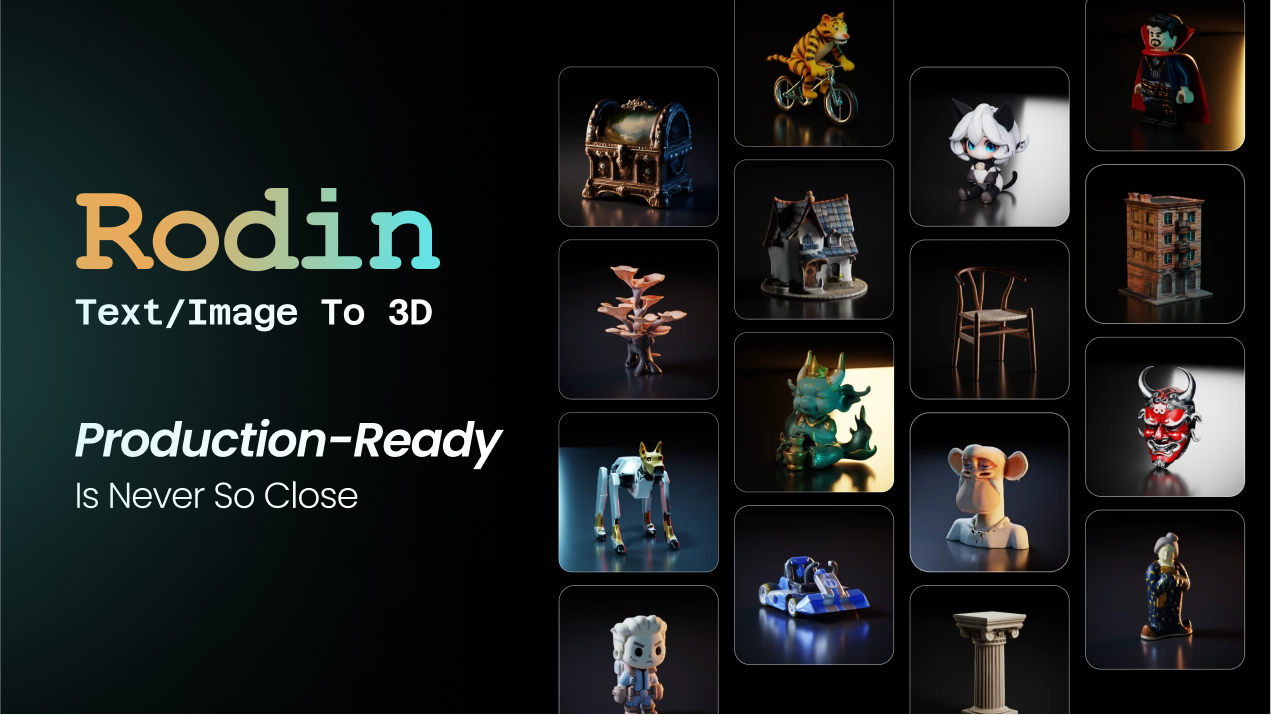
What is Hyper3D Rodin?
Hyper3D Rodin is an advanced AI-driven 3D model generator designed to create high-quality 3D assets from textual descriptions and images in a matter of seconds. This powerful tool addresses the growing need for efficiency and accessibility in 3D modeling, allowing users with little to no background in 3D design to generate complex models quickly and easily. As the demand for 3D content increases across diverse industries such as gaming, e-commerce, education, and virtual reality, Hyper3D Rodin provides a streamlined solution that meets both creative and technical specifications, enhancing productivity while maintaining quality.
The main workflow of Hyper3D Rodin is remarkably straightforward. Users can start by uploading a reference image, sketch, or product photo, or by entering a descriptive text prompt. Once input is provided, the system utilizes its cutting-edge technology to generate intricate 3D meshes complete with UVs, textures, and other essential details. With multiple editing and refining tools, users can control aspects like part separation, texture quality, and optimization before exporting their models in widely used formats such as OBJ, FBX, GLB, and STL. This approach not only simplifies the modeling process but also guarantees high-speed output, making it a valuable tool for a variety of creative pursuits.
One of the standout features of Hyper3D Rodin is its ControlNet capabilities, allowing users to guide the generation of 3D shapes and structures through tools like bounding boxes, voxels, and point clouds. This level of control ensures that the outputted models closely align with the user's vision, accommodating complex or simple designs alike. Additionally, the AI Avatar Generator creates realistic, animatable characters, while the AI Texture Generator transforms ordinary images into unique textures suitable for 3D assets. The advanced OmniCraft tool further expands functionality by generating high-dynamic-range environment maps, making it easier to integrate lighting solutions into rendered scenes.
The tool is ideally suited for a diverse range of users including 3D artists, game developers, product teams, and engineers. For example, game developers can efficiently convert concept art and images into 3D props and environment assets tailored for game engines like Unity and Unreal Engine. Product teams benefit by using Hyper3D to create interactive 3D product visuals for e-commerce and marketing. Furthermore, educators and architects can utilize the tool for creating models that enhance client presentations and educational content. Its versatility allows users in varying fields—from automotive design to NFT creation—to leverage 3D technology without the steep learning curve typically associated with model-making.
Hyper3D Rodin's positioning in the realm of AI-generated 3D tools is marked by its high-quality output and user-friendly interface, distinguishing it from competitors. With fast processing times, often generating complex models in just a few seconds, and advanced editing controls, it outperforms many traditional 3D software platforms that require extensive manual input and expertise. This efficiency is compounded by the platform's ability to handle models with over 10 million polygons, recently highlighted by users praising Rodin Gen-2.5 for its detail and structural integrity.
Despite its advantages, Hyper3D Rodin does have limitations. Users may find that the quality of generated models is heavily dependent on the quality of the input images or descriptions; poorly lit or cluttered images can yield less satisfactory results. Additionally, while the tool is designed for ease of use, some users may still experience a learning curve when navigating its more advanced features. Furthermore, while it integrates seamlessly with many standard 3D software solutions, users seeking specialized functionality may need to explore additional software for further refinement and editing post-generation. Therefore, potential users should assess their specific needs and workflows to ensure a proper fit with Hyper3D Rodin.
Who it's for
Works with
What Hyper3D Rodin can do
8 capabilities, verified from the product.
- Create 3D models from text prompts
- Detailed 3D assets from images
- AI-driven precision for model generation
- Supports multiple common 3D formats
- Fast processing times for model creation
- Advanced editing tools for textures and parts
- OmniCraft toolbox for HDRI generation
- Seamless integration with popular 3D software
Jobs people hire it for
- 01Generate 3D models for game development
- 02Create product assets for e-commerce visualizations
- 03Design architectural models for presentations
- 04Produce customizable 3D prints
- 05Develop characters for animation or VR projects
Pros & cons
Where it shines
- Hyper3D Rodin generates high-quality models quickly, reducing time in the creative pipeline.
- The platform requires no prior 3D experience, making it accessible for a wide audience.
- Advanced editing controls offer flexibility to refine and optimize generated models easily.
- It supports a range of file formats suitable for various applications, enhancing its versatility.
- The integration with established 3D tools allows for a smooth workflow without disrupting creative processes.
Where it falls short
- The quality of generated models can heavily depend on the quality of input images or prompts.
- Users may face a slight learning curve when accessing advanced control features.
- While user-friendly, certain advanced features may require time to fully master for optimal results.
- The potential need for post-processing in specialized software to achieve desired outcomes may burden some users.
- Users should be aware of licensing and commercial use stipulations based on their usage plans.
Pricing
Free 7-day trial with options for subscription thereafter Pricing can change — always confirm on the vendor's site.
Frequently asked about Hyper3D Rodin
What makes Hyper3D useful for 3D generation?
Hyper3D helps you turn images into usable 3D assets quickly without starting from manual modeling. With Hyper3D Rodin, you can generate 3D models from images, refine the output, and export to common 3D formats for games, 3D printing, AR/VR, product visualization, and creative production workflows.
What kind of image works best with Hyper3D?
For the best results, use a clear, high-resolution image with one main subject, good lighting, and minimal background clutter. Product-style images, character references, collectibles, props, and objects with visible shape details usually work well. Avoid blurry photos, complex scenes, heavy shadows, or images where the subject is partially blocked.
Can I use more than one image to create a 3D model?
Yes. Hyper3D supports multi-image generation on eligible workflows, allowing you to upload multiple views of the same object. This can improve shape accuracy, proportion consistency, and texture quality, especially for products, characters, and objects with important side or back details.
What can I export from Hyper3D?
Hyper3D supports common 3D formats such as STL, FBX, OBJ, GLB, GLTF, and USDZ. You can use STL for 3D printing, GLB/GLTF for web and AR workflows, FBX for game engines, OBJ for general 3D editing, and USDZ for Apple AR experiences.
Can Hyper3D models be used in commercial projects?
Yes, Hyper3D can support commercial workflows depending on your plan and license. Paid and enterprise options are designed for professional use cases such as games, e-commerce, product visualization, advertising, AR/VR, 3D printing, and production pipelines.
How can I improve the quality of my generated 3D model?
Start with a clean source image, choose the correct image direction when available, and use multiple views if you have them. After generation, you can refine the asset with mesh editing, texture tools, low-poly optimization, or external 3D software such as Blender, Maya, Unity, or Unreal Engine.
Is Hyper3D only for artists, or can developers use it too?
Hyper3D is built for both creators and technical teams. Artists can use it to accelerate asset creation, while developers and studios can use API access and enterprise options to integrate AI 3D generation into applications, marketplaces, game pipelines, or internal production systems.
What can I do after generating a model with Hyper3D?
You can use the model for 3D printing, game development, AR/VR, animation, product renders, e-commerce visuals, concept design, marketing images, and interactive web experiences. You can also export it to your preferred 3D software for retopology, material tuning, rigging, or final production cleanup.
Ready to try Hyper3D Rodin?
1,583 people checked it out on the directory — see it in action on the official site.
Keep exploring
Similar tools in Image Generation
Midjourney
The image generator artists reach for — stunning, stylized visuals from text prompts.
 Image Generation
Stable Diffusion
The open-source image model you can run, fine-tune, and ship anywhere.
Ideogram
Text-to-image generation that actually nails typography, logos, and text inside images.
 Image Generation
AI Photo Filter
Transform your photos into unique artworks with AI filters.