- Views
- 2,204
- Upvotes
- 337
- Launched
- —
What is Ghost?
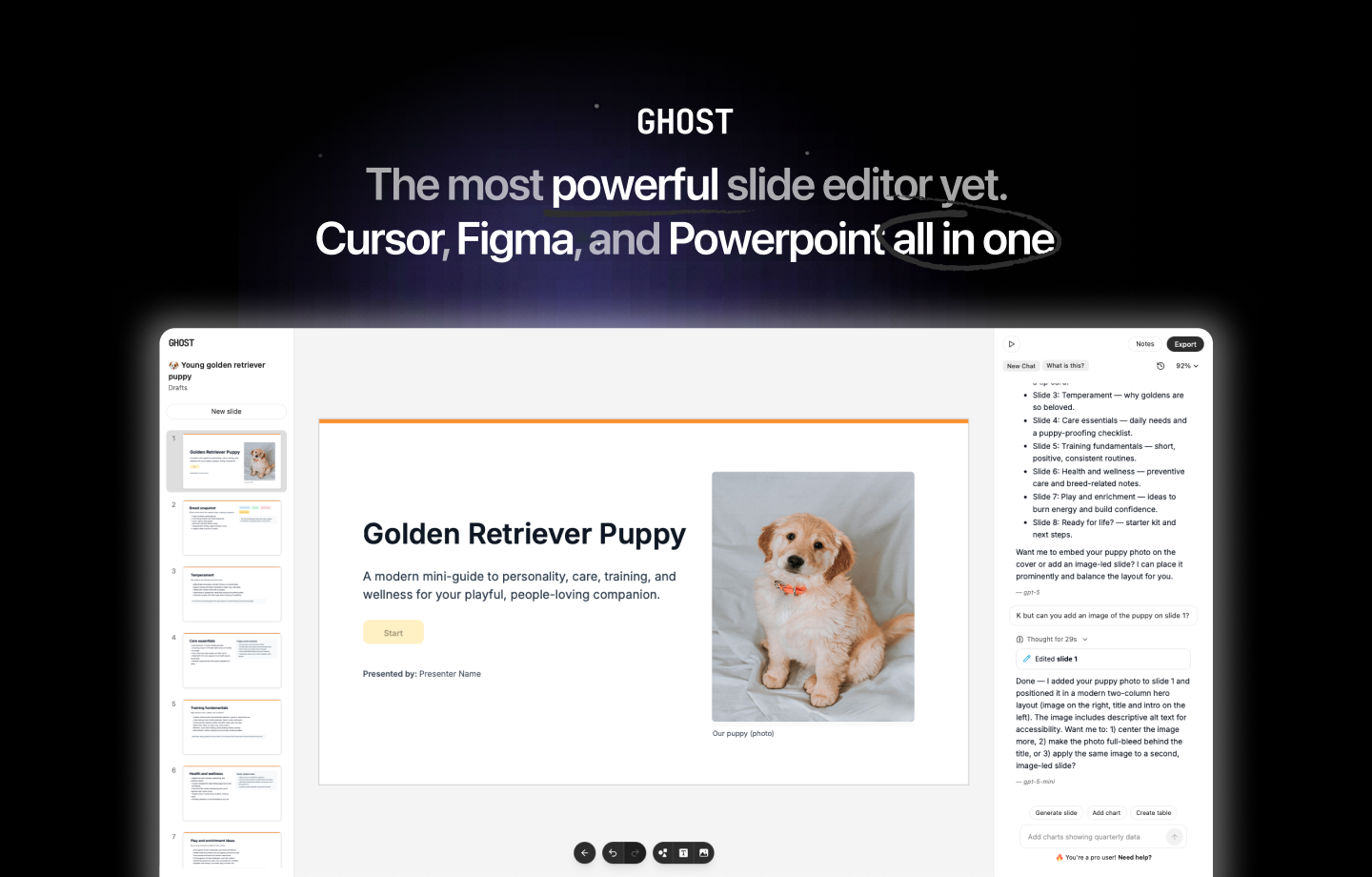
Ghost is an innovative AI-native presentation editor designed to simplify and enhance the creation of visually appealing slides. By leveraging GPU-accelerated editing and straightforward controls, Ghost allows users to design, redesign, and export presentation slides effortlessly. This powerful tool addresses the common challenges faced by presenters, such as time constraints, design skills, and the need for immediacy in generating high-quality visual content. With Ghost, users can focus on the message they want to convey, rather than getting bogged down in the mechanics of slide design.
The core workflow of Ghost revolves around its intuitive interface that minimizes the learning curve for new users while maximizing functionality for seasoned professionals. The editor easily integrates AI-driven features that streamline the presentation design process, allowing users to input their content and rely on the AI to assist in the layout and styling of slides. This results in a fluid design process where creativity can thrive without the frustration often associated with traditional presentation software. Users can export their presentations instantly, making it an ideal solution for those who need to create and share compelling presentations on short notice.
One of the standout capabilities of Ghost is its GPU-accelerated editing, which not only enhances performance but also allows for real-time updates and tweaks to presentations. This means that as users make changes or add new content, the AI and GPU work together to instantly render the updates, giving users immediate results. Ghost’s simple controls ensure that users can navigate the presentation editing process with ease, regardless of their technical skill level. The combination of speed, efficiency, and powerful design tools sets Ghost apart in a crowded market of presentation software.
Ghost is tailored for a diverse array of users, including educators, marketers, business professionals, and anyone else who needs to create high-impact presentations quickly. For educators conducting lectures, Ghost can help build visually engaging slide decks that enhance student understanding. Marketers can utilize Ghost to generate quick pitches or marketing slides that impress clients and stakeholders, all while maintaining a professional look. Business professionals can leverage the speed and efficiency of Ghost to develop impactful presentations for meetings or conferences without the typical hassle of presentation software.
In terms of market positioning, Ghost operates in the realm of presentation design tools, competing with established software but setting itself apart with its AI capabilities and GPU-enhanced performance. While traditional tools often require time-consuming manual adjustments, Ghost aims to revolutionize this process by embedding intelligence into its workflows. This positions Ghost as not just another presentation tool, but a quicker, smarter alternative that adapts to the user's needs, offering rapid output without sacrificing quality.
However, as with any tool, Ghost does encounter certain limitations. Users may initially find some advanced features lacking or not as deep-rooted as in long-established presentation software. For those who require extensive customization or niche design functionalities, Ghost may not fully meet their needs, though its focus on rapid production and ease of use provides a compelling trade-off. Additionally, users should ensure that their devices support GPU acceleration for optimal performance, as this feature is essential for the quick turnaround Ghost promises. Overall, Ghost is a fresh and innovative solution in the presentation tool landscape, harnessing the power of AI to streamline the design process for any user.
Who it's for
What Ghost can do
8 capabilities, verified from the product.
- GPU-accelerated editing for instant results
- AI-native workflows for streamlined design
- Simple controls for easy navigation
- Instant export of presentations
- Supports rapid redesigning of slides
- Optimized for collaboration on presentations
- Flexible layout options based on content
- Real-time updates with immediate visual feedback
Jobs people hire it for
- 01Create stunning and quick presentation slides for meetings
- 02Design visually appealing educational materials for students
- 03Generate impactful marketing presentations on short notice
- 04Redesign existing slides effortlessly without starting from scratch
- 05Collaborate with teams on presentation projects remotely
Pros & cons
Where it shines
- The GPU acceleration provides rapid performance for editing slides.
- AI-driven features assist users in creating professional designs effortlessly.
- Simple controls make it accessible for users with all skill levels.
- Instant export features enable quick sharing of finished presentations.
- Flexibility in design allows for varying levels of detail and complexity.
Where it falls short
- Some advanced design features may be underdeveloped compared to existing tools.
- Initial learning curve for users unfamiliar with AI-driven applications.
- Requires compatibility with devices that support GPU acceleration.
- Limited customization options for niche design requirements.
- Still relatively new compared to more established presentation software.
Pricing
See the official website for current pricing. Pricing can change — always confirm on the vendor's site.
Frequently asked about Ghost
What is Ghost and what problem does it solve?
Ghost is an AI-native presentation editor that simplifies the slide creation process through GPU-accelerated editing and straightforward controls. It addresses common issues such as time constraints and the need for visually appealing presentations, allowing users to focus on their content rather than design mechanics.
How does Ghost work?
Ghost operates through an intuitive interface that integrates AI-driven functionalities, enabling users to input content and receive design assistance automatically. It allows for rapid design iterations and instant exports, making it easy to create and share presentations.
What are the standout features of Ghost?
Ghost's standout features include GPU-accelerated editing for real-time updates, AI-native workflows that streamline design, simple navigation controls, and instant export capabilities that enhance productivity.
Who can benefit from using Ghost?
Ghost is geared towards a wide range of users, including educators creating lecture materials, marketers preparing pitches, business professionals needing meeting slides, and anyone seeking to produce visually effective presentations quickly.
How does Ghost compare to traditional presentation tools?
Ghost positions itself as a faster, smarter alternative to traditional presentation software by embedding AI capabilities that reduce manual effort in design. While established tools may offer deeper customization, Ghost focuses on rapid output without compromising quality.
Are there any limitations to using Ghost?
Some users may find that advanced features are not as comprehensive compared to other established tools, and the optimal performance depends on having compatible devices that support GPU acceleration. There may also be a slight learning curve for users new to AI-driven applications.
What is the pricing model for Ghost?
Ghost is offered for free, providing users access to its AI-native presentation capabilities without any associated costs.
What platforms does Ghost support?
Currently, Ghost is available as a web application, allowing users to create and edit presentations online without needing to download software.
Ready to try Ghost?
2,204 people checked it out on the directory — see it in action on the official site.
Keep exploring
Similar tools in Writing & Content
 Writing & Content
Grammarly
AI writing assistance everywhere you type — grammar, tone, clarity, and full rewrites.
 Writing & Content
Notion AI
AI built into your workspace — write, summarize, and answer questions across all your docs.
 Writing & Content
Jasper
The AI marketing platform for on-brand content at scale — campaigns, blogs, and copy.
 Writing & Content
Plot Factory
An online story planner for creating, organizing, and writing stories.