
Fotor AI Image Generator
Transform text or images into high-quality AI visuals effortlessly.
What is Fotor AI Image Generator?
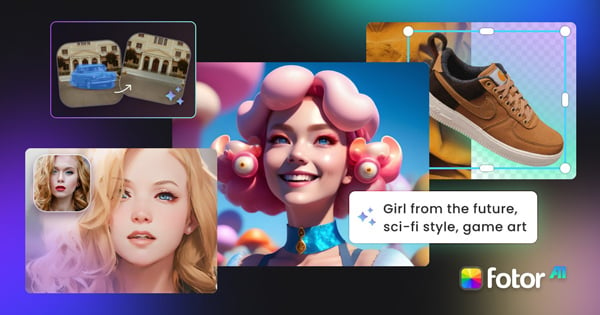
Fotor AI Image Generator is a powerful online tool designed to turn your textual or visual ideas into high-quality images with remarkable speed and flexibility. This tool effectively bridges the gap between abstraction and imagery, enabling creators to translate concepts into visuals without needing advanced design skills or extensive resources. It not only generates images in various styles—including realistic photography, illustrations, anime, and even cyberpunk aesthetics—but also incorporates advanced editing capabilities that allow users to refine their creations seamlessly. With its intuitive interface and advanced technology, Fotor alleviates the challenges often faced in traditional graphic design workflows, making it an exciting option for both professionals and amateurs alike.
Who it's for
What Fotor AI Image Generator can do
8 capabilities, verified from the product.
- Transform text prompts into detailed images
- Upload multiple reference images for fusion
- Utilizes top AI models like Nano Banana and Midjourney
- Supports high-resolution outputs up to 4K
- Offers image editing within the same workflow
- AI prompt enhancer for optimized instructions
- Batch generation for multiple image outputs
- Community-driven AI prompt library for inspiration
Jobs people hire it for
- 01Create marketing visuals for social media campaigns
- 02Generate professional e-commerce product images
- 03Visualize concepts for design and architecture projects
- 04Produce illustrations for novels and storyboards
- 05Craft engaging ad creatives for online marketing
Pros & cons
Where it shines
- Combines powerful image generation with robust editing tools, reducing the need for multiple apps.
- Offers high-resolution images suitable for print and professional use, ensuring quality in every output.
- Allows for unique creations every time, leveraging AI to interpret prompts creatively and dynamically.
- Includes an intuitive prompt enhancer, making it accessible even for those without technical skills in prompt writing.
Where it falls short
- While it offers many features, some users may find it complex at first due to its extensive capabilities.
- Dependence on upload speed for image generation efficiency might affect real-time creation on slower connections.
- There may be occasional limitations with specific image styles or themes depending on the chosen AI model.
Pricing
Free tier with daily credits available for AI image generation Pricing can change — always confirm on the vendor's site.
Frequently asked about Fotor AI Image Generator
What is the best AI image generator?
The best AI image generator varies by user needs, but Fotor excels in combining leading image models with integrated editing tools. Unlike others that focus solely on generating images, Fotor allows users to edit their creations directly, making it an exceptional choice for those requiring both functionalities.
Is it free to use Fotor AI image generator?
Yes, Fotor AI image generator is free to try. Users can generate images from text or images without requiring an account, along with daily credits to explore different AI models and styles.
Does the AI create unique images?
Absolutely. Each image generated by Fotor's AI text to image generator is unique, allowing users to transform their ideas into distinctive pieces of visual art without starting from scratch.
Can I use Fotor AI photo generator on mobile?
Yes, Fotor's AI image generator is accessible on both PC and mobile devices, enabling users to generate images anytime, anywhere.
Can I use AI-generated images for commercial purposes?
Yes, the images generated with Fotor’s AI can be used for commercial projects, making it suitable for marketing campaigns, e-commerce, branding, and client work.
Can I edit an AI-generated image after creating it?
Yes, Fotor provides the capability to edit images post-generation. Users can specify changes using simple text prompts, along with access to over 100 built-in AI editing tools.
Does Fotor support high-resolution AI image generation?
Yes, Fotor allows users to generate images at up to 4K resolution and further upscale them using their AI upscaling option, which is ideal for professional design and print requirements.
How can I ensure my character or brand style stays consistent?
To maintain consistency in characters or brand styles, users can upload reference photos which lock in specific features, ensuring uniformity across different creations. Additionally, selecting AI models with dedicated features for reference helps preserve visual identity.
Ready to try Fotor AI Image Generator?
1,357 people checked it out on the directory — see it in action on the official site.
Keep exploring
Similar tools in Image Generation
Midjourney
The image generator artists reach for — stunning, stylized visuals from text prompts.
 Image Generation
Stable Diffusion
The open-source image model you can run, fine-tune, and ship anywhere.
Ideogram
Text-to-image generation that actually nails typography, logos, and text inside images.
 Image Generation
AI Photo Filter
Transform your photos into unique artworks with AI filters.