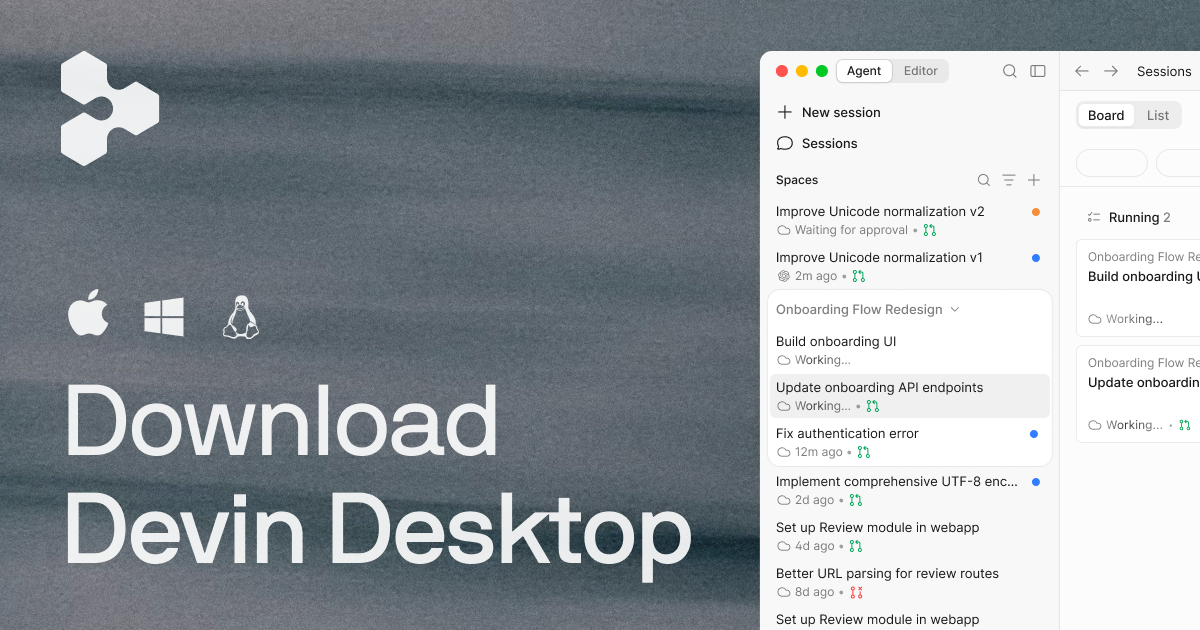
What is Devin Desktop?
Devin Desktop, previously known as Windsurf, represents a significant evolution in the way developers interact with their coding agents, providing a unified command center for managing both local and cloud-based entities. The primary goal of Devin Desktop is to streamline workflows by allowing developers to plan, delegate, review, and deploy code without leaving their integrated development environment (IDE). This tool has been designed specifically for engineering teams that rely heavily on automation and intelligent agents for their coding tasks, addressing the challenges posed by the growing complexity of software development environments where multiple agents must collaborate effectively.
At its core, Devin Desktop integrates various functionalities that enhance coding efficiency. Users can manage multiple agents through the Agent Command Center, which combines features such as Kanban views, spaces for contextual sharing, and streamlined agent management tools. Devin serves both as a robust IDE and a powerful project management dashboard, enabling developers to maintain a clear overview of their programming tasks while ensuring that their agents operate smoothly. By effectively coordinating between different agents, users can keep the coding process organized and cohesive, optimizing productivity and minimizing oversight.
One of the standout features of Devin Desktop is its comprehensive IDE capabilities. It provides essential functionalities like syntax highlighting, auto-complete suggestions, and built-in debugging tools which allow developers to focus on writing and testing their code without interruptions. The IDE ensures that engineers can read, trace, and debug code efficiently, thus maintaining their workflow. Further enhancing its utility, Devin Desktop also includes features like instant codebase context and rapid review of code changes, which are crucial for collaborative programming and continuous integration practices.
Devin Desktop is tailored for developers, engineering managers, and teams that require a high degree of coordination in their software development processes. Typical use cases involve coordinating multiple cross-functional agents, deploying enhancements rapidly, and reviewing extensive code diff changes prior to acceptance by peers or stakeholders. With its integration of both project management and coding capabilities, Devin is perfect for environments like startups, agencies, and larger enterprises where agility and collaboration are key to success.
In terms of market positioning, Devin Desktop offers a unique combination of an IDE and a management platform that caters specifically to agent-based workflows. Many traditional IDEs do not provide the depth of integration required for managing multiple agents effectively, making Devin Desktop a distinctive choice for teams looking for such capabilities. Its support for various programming languages and seamless collaboration features place it above conventional coding environments that lack comprehensive multi-agent management.
While Devin Desktop excels in various aspects, a few caveats should be noted. Firstly, the transition from Windsurf to Devin Desktop, although automated, may require users to familiarize themselves with updated features and navigation within the new interface. Additionally, while its multi-agent management capabilities are robust, users with solely individual coding needs may find some of the functionalities redundant. Therefore, evaluating the full suite of features against specific needs is recommended before fully committing to the platform as a standalone development environment.
Who it's for
Works with
What Devin Desktop can do
8 capabilities, verified from the product.
- Manage local and cloud agents
- Integrated project management tools
- Full IDE with debugging capabilities
- Kanban view for task management
- Instant codebase context retrieval
- Syntax highlighting and autocomplete
- Multi-agent coordination
- Built-in spaces for context sharing
Jobs people hire it for
- 01Manage multiple coding agents simultaneously.
- 02Perform codebase reviews rapidly before deployment.
- 03Utilize integrated development features for coding tasks.
- 04Streamline team collaboration with shared contexts.
- 05Automate testing and deployment workflows using agents.
Pros & cons
Where it shines
- Offers a comprehensive command center for agent management.
- Combines IDE features with project management tools seamlessly.
- Suitable for collaborative team environments with multiple users.
- Supports a wide array of programming languages and frameworks.
Where it falls short
- Learning curve associated with new features and interface changes.
- May offer too many features for individual solo developers.
- Transition from Windsurf could require some adjustment.
- Not all integrations are specified, which may limit customization options.
Pricing
Free
$0
Basic access to features and functionalities.
Pro
$20 per month
Popular plan with enhanced capabilities.
Max
$200 per month
Comprehensive package for extensive needs.
Teams
$80 /mo + $40/mo per full seat
Collaborative access for team environments.
Enterprise
Let's talk
Customized solutions for large organizations.
Free and paid tiers starting from $20/mo Pricing can change — always confirm on the vendor's site.
Frequently asked about Devin Desktop
What is Devin Desktop?
Devin Desktop is the new name for Windsurf, transforming it into a command center for managing coding agents in a unified space. It retains the robust IDE experience while introducing enhanced multi-agent management features.
How do I upgrade to Devin Desktop from Windsurf?
Upgrading to Devin Desktop is straightforward as it arrives via an over-the-air update. All your existing plans, pricing, extensions, and settings will be automatically migrated.
Will I lose anything if I update?
No, users will not lose any functionalities with the update. Your IDE configurations, extensions, and workflows will remain intact and fully migrated when updating to Devin Desktop.
Does my plan or pricing change?
No, your current plan and pricing remain exactly the same, including any legacy Windsurf Enterprise plans.
What is happening to JetBrains support?
Windsurf for JetBrains (including IntelliJ IDEA, PyCharm, and WebStorm) continues to be available for download, ensuring users can still access the previous functionalities.
Who is Devin Desktop intended for?
Devin Desktop is designed for development teams and engineers who require an effective way to manage multiple coding agents and streamline collaborative workflows.
What are the standout capabilities of Devin Desktop?
Devin Desktop features an integrated IDE, agent management tools, a Kanban view for task organization, instant access to relevant codebases, and a variety of debugging tools to enhance the coding experience.
What are the pricing tiers for Devin Desktop?
Devin Desktop offers a free tier, a popular Pro plan at $20 per month, a Max plan at $200 per month, a Teams plan starting at $80/mo plus $40/mo per full seat, and an Enterprise plan available on request.
Ready to try Devin Desktop?
1,975 people checked it out on the directory — see it in action on the official site.
Keep exploring
Similar tools in Coding & DevTools
 Coding & DevTools
Cursor
The AI-first code editor — chat with your codebase and let agents write multi-file changes.
 Coding & DevTools
GitHub Copilot
Your AI pair programmer — code completions, chat, and agents inside your editor.
 Coding & DevTools
v0
Vercel's AI that turns prompts into production-ready React and Next.js UI.
 Coding & DevTools
E2B
The Enterprise AI Agent Cloud for secure AI workflows