- Views
- 1,972
- Upvotes
- 338
- Launched
- —
What is Cleanup.pictures?
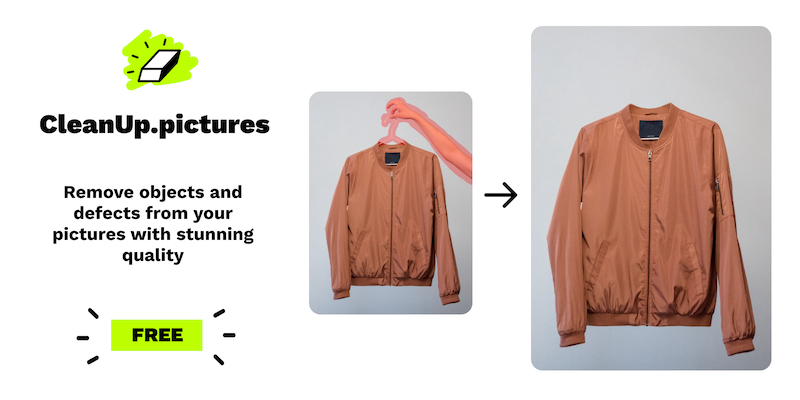
Cleanup.pictures is an intuitive web application designed to simplify the complex process of image retouching by allowing users to remove unwanted elements from photos, including people, objects, text, and other defects. It addresses common challenges faced by photographers, marketers, and content creators who need to present images in their best form without the distraction of imperfections or clutter. By leveraging advanced artificial intelligence (AI) technology, Cleanup.pictures provides a seamless and effective solution for enhancing image quality, thereby streamlining the editing workflow for both casual users and professionals alike.
The core workflow of Cleanup.pictures is straightforward. Users simply upload an image to the platform via drag-and-drop functionality. Once the image is loaded, they can use the provided editing tools to select unwanted elements they wish to remove. The AI analyses the surrounding pixels and intelligently fills in the area, allowing for an almost invisible removal of the unwanted object. The process is highly efficient; users can achieve satisfactory results in just a few clicks, making it ideal for those who may not have extensive photo editing experience or the desire to navigate complex editing software.
Notable capabilities of Cleanup.pictures include its ability to handle unlimited image removals, catering to users needing to process a large volume of images, such as professional photographers or e-commerce businesses. The app is especially effective in inpainting, using AI to reconstruct backgrounds seamlessly after the removal of objects. Users can also remove watermarks and logos from images, a feature particularly useful for social media managers aiming to clean up promotional materials. Additionally, cleanup.pictures supports both free and paid usage; the free tier allows image exports at a resolution limited to 720p, whereas the Pro subscription enables users to work with images of unlimited resolution. This functionality is particularly appealing for anyone needing detailed prints or high-quality digital content.
Cleanup.pictures caters to various user groups, including photographers looking to perfect their images for clients, creative agencies producing captivating visuals for campaigns, and real estate professionals requiring polished images of properties. E-commerce businesses also benefit from the app by enhancing product images to attract potential buyers, making their listings stand out. The API offers developers a way to integrate this powerful image retouching functionality into their own applications, enabling broader use cases across industries such as social media, marketing, and content creation.
Compared to other image editing solutions, Cleanup.pictures stands out due to its reliance on AI rather than traditional cloning methods. Many existing tools require a background reference to effectively clone over unwanted areas, which can lead to a time-consuming and complex editing process. Cleanup.pictures, on the other hand, simplifies this by allowing the AI to predictively fill in areas without requiring the user to provide a reference. As a result, users experience quicker editing times and improved overall quality in their images. Additionally, the platform is continuously optimized to enhance the quality and performance of the editing experience.
However, some limitations exist with Cleanup.pictures. While the free tier is exceptionally useful for casual users, it restricts the export resolution to 720p, which may not suffice for high-resolution needs. Moreover, a subscription is necessary for users who require unlimited resolutions or advanced functionalities, which could deter users on a tight budget. The subscription is also limited to one user, which might not be ideal for teams that wish to collaborate using a single account. Lastly, while the AI generally performs well, it may not be perfect in every scenario, and there could be instances where manual adjustments are still necessary for optimal results.
Who it's for
Works with
What Cleanup.pictures can do
8 capabilities, verified from the product.
- Remove unwanted objects seamlessly
- Erase people from photos quickly
- Edit images without complex software
- Supports unlimited image uploads
- High-resolution export for Pro users
- AI-powered inpainting for better results
- Remove watermarks and logos effortlessly
- User-friendly drag and drop interface
Jobs people hire it for
- 01Remove tourists from holiday pictures
- 02Create profile pictures without blemishes
- 03Enhance product images for e-commerce
- 04Generate clean real estate images for listings
- 05Depersonalize images for general use
Pros & cons
Where it shines
- Highly intuitive and easy-to-use interface regardless of user skill level.
- Utilizes advanced AI technology for superior inpainting compared to traditional tools.
- Allows for unlimited image processing in the free version, making it accessible for all.
- Pro version offers high-resolution exports necessary for professional applications.
Where it falls short
- Free version limits exports to 720p resolution, which may not meet all users' needs.
- Subscription model is limited to one user, which can be inconvenient for teams.
- While AI is efficient, it might not achieve perfect results in every instance, requiring additional manual editing.
- Basic functionality might not satisfy advanced editors looking for comprehensive editing tools or features.
Pricing
Free
$0
Unlimited images, resolution limited to 720p.
Pro
$5/mo
Unlimited images and high-resolution exports.
Free tier + $5/mo for Pro features Pricing can change — always confirm on the vendor's site.
Frequently asked about Cleanup.pictures
What is Inpainting?
Inpainting is a retouch technology allowing for the removal of unwanted objects from photos, such as people or text. Unlike traditional methods that use cloning, Cleanup.pictures leverages artificial intelligence to achieve seamless results, filling in areas based on the context of surrounding pixels.
Why is Cleanup.pictures better than other inpainting apps?
Cleanup.pictures is advanced due to its AI-driven approach, which provides much more accurate object removal without needing a background reference, unlike traditional clone stamp tools. This results in better overall image quality with significantly less effort from the user.
What image resolutions can Cleanup.pictures handle?
Users can import and edit images of any size. However, the free version restricts exports to 720 pixels. In contrast, the Pro version allows exporting images without any size limitations, catering to users who require high-resolution outputs.
How much does Cleanup.pictures cost?
Cleanup.pictures is free to use with limited features. For enhanced capabilities and high-resolution image processing, a subscription is available at $5 per month or $36 annually, offering a significant discount.
What is your refund policy?
Cleanup.pictures offers a free trial period that allows users to evaluate the features before making a purchase decision. Refunds are rarely issued and are conditional depending on usage time and technical issues, especially within the first 14 days.
How can I use the inpainting API?
The Cleanup API can be utilized across various programming environments such as Node.js, SwiftUI, and Kotlin. Extensive documentation, live demos, and numerous samples are provided to assist developers in integrating the API efficiently.
How do I remove unwanted objects or people from a photo?
To remove unwanted elements from a photo, simply upload the image, select the areas to be removed using the brush tool, and the AI will process the image, creating a clean result in just a few seconds.
How do I manage my subscription?
Subscription management can easily be handled by accessing the 'manage subscription' section within your account settings on the Cleanup.pictures platform.
Ready to try Cleanup.pictures?
1,972 people checked it out on the directory — see it in action on the official site.
Keep exploring
Similar tools in Image Generation
Midjourney
The image generator artists reach for — stunning, stylized visuals from text prompts.
 Image Generation
Stable Diffusion
The open-source image model you can run, fine-tune, and ship anywhere.
Ideogram
Text-to-image generation that actually nails typography, logos, and text inside images.
 Image Generation
AI Photo Filter
Transform your photos into unique artworks with AI filters.