
aiCarousels
The Fastest Way to Create Social Media Carousels for LinkedIn, Instagram, and TikTok
- Views
- 1,438
- Upvotes
- 163
- Launched
- —
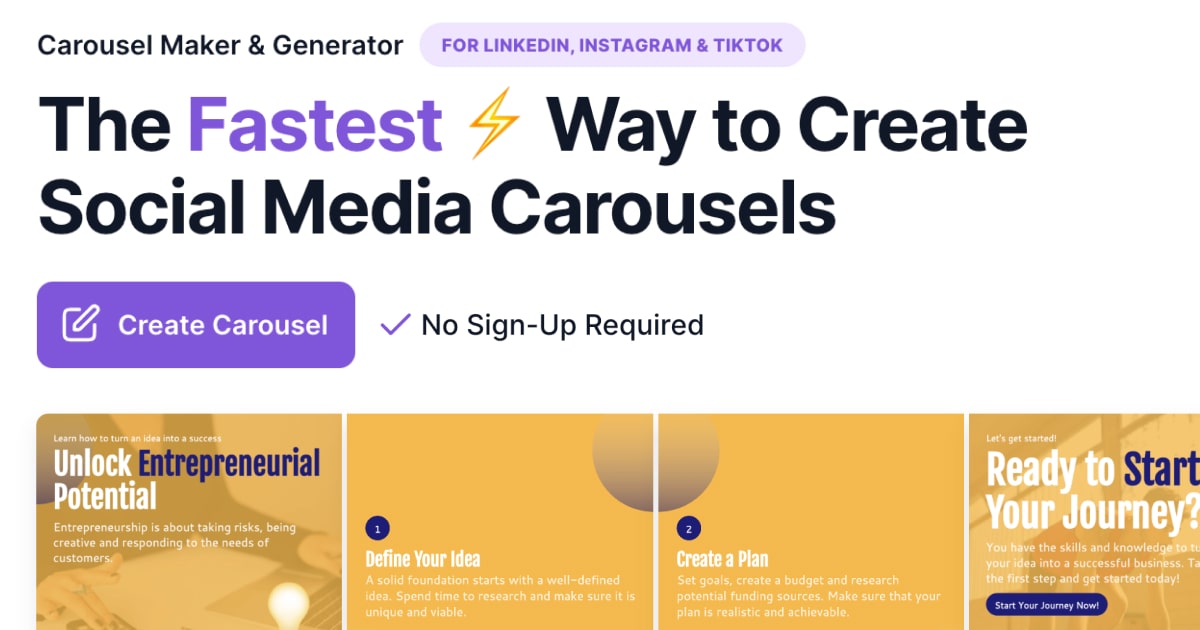
What is aiCarousels?
aiCarousels is an innovative online tool that simplifies the creation of visually engaging carousel posts for social media platforms, particularly LinkedIn, Instagram, and TikTok. Designed primarily for users who may not possess strong design skills, aiCarousels addresses the challenge many face when it comes to producing high-quality, compelling content. With the growing importance of social media engagement, having an accessible means of creating captivating carousels is essential for both individuals and businesses looking to enhance their online presence. This tool allows users to produce professional-looking carousels quickly and easily, elevating their content without the need for extensive design expertise.
The core workflow of aiCarousels is user-friendly and efficient. Users start by selecting a topic or providing existing content, after which the integrated AI writing assistant generates a captivating carousel layout. Once the textual content is drafted, users can customize their design using predefined colors and fonts for a coherent visual identity. The platform features smart auto-resizing elements, which adjust automatically to maintain an aesthetically pleasing layout. Once users finalize their creations, they can export the carousels in high-quality formats suitable for their targeted social media channels.
Standout capabilities of aiCarousels include the AI writing assistant, which is particularly beneficial for users facing writer's block or looking for fresh content ideas. Alongside carousel creation, the platform offers several bonus features that extend its functionality, such as a LinkedIn post generator, post formatter, and quote card generator. These additional features not only facilitate traditional carousel posts but also empower users to experiment with various content formats. The infographics generator is another compelling feature, allowing users to transform different media such as text and URLs into visually appealing infographics. The comprehensive scope of the tool encourages users to diversify their content approach, ensuring they maintain audience engagement across different formats.
aiCarousels appeals to a broad range of users including marketers, content creators, and small business owners who require a streamlined solution for producing high-quality content. It is especially useful for those seeking to optimize their social media strategies without significant upfront investment in design personnel or expensive software. Typical scenarios include marketers needing to boost user engagement through visually appealing carousels, personal brands aiming to share complex information in an accessible format, or businesses wanting to create product showcases on platforms like Instagram.
In terms of competitive positioning, aiCarousels is unique in that it combines carousel creation with added functionalities aimed at enhancing overall content generation. While there are other tools dedicated solely to design or to content writing, aiCarousels stands out by merging these two critical elements. The focus on social media carousels positions it well within a growing market where visual content is crucial.
Although aiCarousels is strong in many areas, it is not without limitations. While it doesn’t require design expertise, users may still need a certain level of creativity and understanding of effective social media strategies to fully leverage the tool's capabilities. Additionally, while there is a wide variety of features available, not every user may utilize the full potential of each tool, and the interface could be overwhelming for complete beginners at first. Finally, the lack of detailed integration options with other social media management tools may limit its functionality for users who prefer a more interconnected workflow.
Who it's for
What aiCarousels can do
10 capabilities, verified from the product.
- AI Writing Assistant for carousel content
- User-friendly design platform
- Smart auto-resizing elements for designs
- Predefined color palettes and font pairings
- Fully customizable templates for branding
- Export high-quality visuals for social media
- LinkedIn post generator with templates
- Infographic generator from various media
- Quote card generator for social media
- Headshot generator for professional images
Jobs people hire it for
- 01Create engaging carousels for social media marketing
- 02Generate LinkedIn posts that attract engagement
- 03Craft infographics from existing content
- 04Design visually appealing quote cards for branding
- 05Produce professional headshots from selfies
Pros & cons
Where it shines
- Intuitive design interface suitable for non-designers
- Integration of AI tools streamlines content creation
- Wide array of features beyond basic carousel creation
- Customizable templates ensure brand consistency
- High-quality output suitable for various platforms
Where it falls short
- Limited integration options with third-party tools
- May require creative skills to maximize effectiveness
- Initial learning curve for complete beginners
- Some features may not be utilized by all users
- Best suited for social media, not general design needs
Pricing
See the official website for current pricing. Pricing can change — always confirm on the vendor's site.
Frequently asked about aiCarousels
What is a social media carousel?
A social media carousel is a content format that allows users to showcase multiple images within a single post on platforms like Instagram and LinkedIn. By using a carousel, brands and individuals can tell a more comprehensive story or share multiple pieces of related content without overwhelming audiences with many separate posts.
How to post a carousel on LinkedIn?
To post a carousel on LinkedIn, download the PDF containing multiple pages representing the slides. Open LinkedIn, create a new post, and select the document icon to upload your PDF. Add a caption and relevant hashtags, then click Publish. LinkedIn will display your uploaded PDF as a carousel.
How to make a carousel on Instagram?
To create a carousel on Instagram, open the app, tap the '+' icon, and select 'Library' (or 'Gallery') to choose images. Select the first piece and tap the 'Select Multiple' icon to add more content. Edit and arrange the images, then add a caption and hashtags before sharing.
How to make a carousel on TikTok?
To upload a carousel to TikTok, tap the '+' icon, select 'Upload' to choose photos, and tap 'Next' to edit. You can add music and effects, then write a caption and hashtags before sharing your carousel.
Can I use aiCarousels for carousel ads?
Yes, aiCarousels can create carousel ads for various platforms including Facebook, LinkedIn, and Instagram. Ensure your ads meet each platform's specifications to optimize performance.
How do I access the Bonus Features?
To access the Bonus Features, click on the 'menu grid' icon located at the top left corner of the screen.
What platforms can I create carousels for?
You can create carousels optimized for LinkedIn, Instagram feeds, Instagram stories, and TikTok using aiCarousels.
Do I need design expertise to use aiCarousels?
No, aiCarousels is designed to be user-friendly and does not require any design expertise to create professional-looking carousels.
Ready to try aiCarousels?
1,438 people checked it out on the directory — see it in action on the official site.
Keep exploring
Similar tools in Marketing & SEO
 Marketing & SEO
Surfer
AI-driven SEO visibility platform for organic growth
 Marketing & SEO
GiftHuntr
Find the perfect gift in seconds using AI-generated suggestions.
 Marketing & SEO
SEO Content AI
Maximize Your SEO Results with AI-Driven Content Solutions
 Marketing & SEO
SEO GPT
Free AI tool for creating optimized SEO content with 300+ formats.