What is Aaavatar?
Aaavatar offers an innovative solution for creating professional-looking team portraits by automating the time-consuming process of background removal. Designed particularly for organizations aiming to enhance their branding and communication, Aaavatar simplifies the task of producing polished team images with minimal effort. Users can drop photos of their team members into the platform, where the tool automatically detects and removes backgrounds in a matter of seconds, making it a valuable asset for any business eager to streamline its visual content creation process.
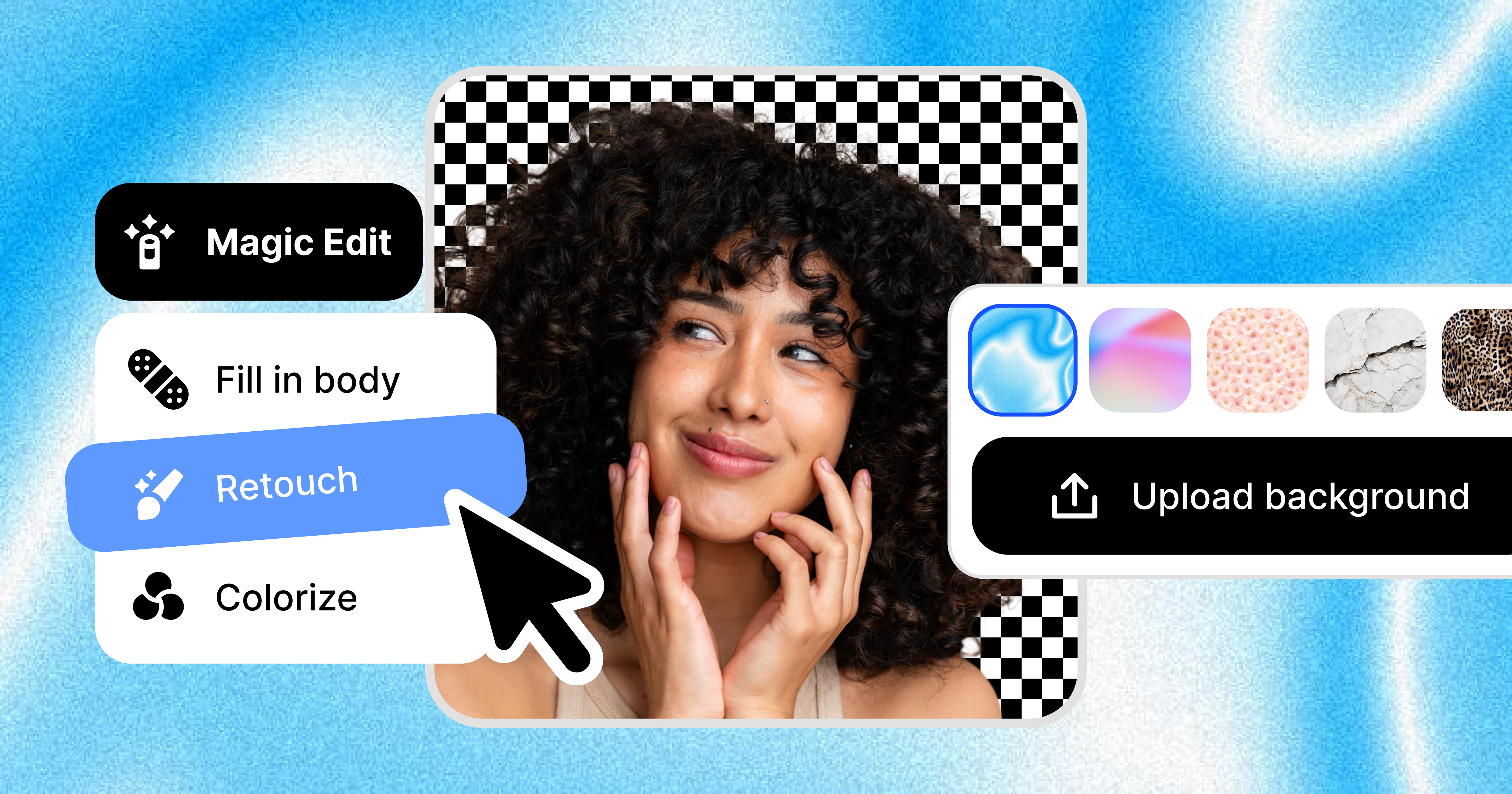
The core workflow of Aaavatar is remarkably straightforward. Users simply drag and drop individual photos of their team members into the interface. Once uploaded, the tool automatically processes these images, seamlessly eliminating backgrounds. This eliminates the need for users to have any graphic design skills or experience with image editing software. After the backgrounds have been removed, users can select a new background from a variety of presets, match their brand colors, or upload their own custom background. This flexibility ensures that the final product aligns closely with any organizational branding, which is crucial for maintaining a cohesive image across all digital platforms.
In addition to background removal, Aaavatar offers features such as automatic shoulder filling and face alignment, which serve to enhance the final images even further. This retouching capability allows businesses to present their team members in a consistently professional manner, ensuring that every image is polished and suitable for use in various formats, such as LinkedIn profiles, Slack communications, or email newsletters. This functionality is particularly useful for companies that frequently update their team imagery or those looking to ensure a cohesive look across different platforms.
Aaavatar is particularly suitable for businesses of all sizes that require high-quality images of their teams for branding purposes. Typical scenarios for usage include creating team profiles for company websites, enhancing visual presentations, or refreshing employee images on social media platforms. The ease of use and rapid processing make it an ideal tool for marketing teams, HR departments, or any organization that values professional imagery as part of its brand identity.
When compared to other tools in the market, Aaavatar stands out due to its specialized focus on team portraits and the seamless integration of automated features that cater specifically to this need. While many image editing tools offer background removal as one of many features, Aaavatar emphasizes a streamlined, user-friendly experience tailored exclusively for team portrait needs. This niche focus allows it to deliver superior results in the specific area of team-oriented visual content, giving it a strong position in that market segment.
However, there are some limitations to be aware of. For instance, currently, Aaavatar only supports Mac for downloads, which means Windows or Linux users need alternative solutions. Additionally, while the automated features are robust, there may be instances where manual intervention is still required to achieve the desired look, especially for images where lighting and angles may create complications during the background removal process. This means that while Aaavatar can significantly speed up the workflow, users should still dedicate some time to reviewing and possibly adjusting their images to meet their standards.
Who it's for
What Aaavatar can do
8 capabilities, verified from the product.
- Automatic background removal
- Drag-and-drop photo uploads
- Browse and select preset backgrounds
- Custom background uploads
- One-click retouching features
- Automatic shoulder filling
- Face alignment and polishing
- Export options for LinkedIn and Slack
Jobs people hire it for
- 01Streamline team profile photo updates for websites
- 02Create high-quality images for social media
- 03Enhance presentation visuals with professional portraits
- 04Produce images for internal communications
- 05Refresh branding materials with consistent team imagery
Pros & cons
Where it shines
- Effortless background removal that requires no design skills
- Fast processing times streamline workflow
- High-quality retouching features enhance final images
- Flexibility in background choices supports brand consistency
Where it falls short
- Mac only, no Windows or Linux version currently available
- Some images may require manual touch-ups for best results
- Limited information on support for larger teams or batch processing
Pricing
See the official website for current pricing. Pricing can change — always confirm on the vendor's site.
Frequently asked about Aaavatar
What is Aaavatar used for?
Aaavatar is used for automating the process of removing backgrounds from team portraits, allowing businesses to create professional-looking images quickly and easily.
Is there a cost to use Aaavatar?
Aaavatar is free to use, offering users the ability to create team portraits without incurring any costs.
What platforms does Aaavatar support?
Currently, Aaavatar is available as a download for Mac users only, with no versions available for Windows or Linux.
What features does Aaavatar offer?
Aaavatar includes automatic background removal, options for preset and custom backgrounds, one-click retouching, and easy export features for various platforms.
Who would benefit from using Aaavatar?
Aaavatar is ideal for businesses, marketing teams, and HR departments that need high-quality team portrait images for branding and communication.
How does Aaavatar compare to other image editing tools?
Aaavatar specifically focuses on team portraits and streamlines the editing process through automation, making it faster and easier than many general-purpose photo editing tools.
Are there any limitations to using Aaavatar?
While Aaavatar offers automated features, some images may still require manual touch-ups, and it currently only supports Mac users, which might limit access.
Can users upload their own backgrounds?
Yes, users can either choose from preset backgrounds or upload their own custom backgrounds to match their brand identity.
Ready to try Aaavatar?
1,807 people checked it out on the directory — see it in action on the official site.
Keep exploring
Similar tools in Image Generation
Midjourney
The image generator artists reach for — stunning, stylized visuals from text prompts.
 Image Generation
Stable Diffusion
The open-source image model you can run, fine-tune, and ship anywhere.
Ideogram
Text-to-image generation that actually nails typography, logos, and text inside images.
 Image Generation
AI Photo Filter
Transform your photos into unique artworks with AI filters.